MCP Server
The DatoCMS MCP server connects DatoCMS directly to AI assistants through the Model Context Protocol (MCP). It allows MCP-compatible tools, such as Claude Code, Claude Desktop, ChatGPT, Cursor, VS Code, and Windsurf, to interact with your DatoCMS projects using natural language commands.
If you already have a repo open in your editor or CLI, skip the MCP server and install DatoCMS Agent Skills instead. They automatically install the DatoCMS CLI, which talks directly to the DatoCMS APIs — faster and no MCP server needed. You get everything MCP can do, plus content modeling, frontend integrations, migrations, and plugin expertise.
MCP is the right choice only where there's no local terminal to work in!
What you can do
The DatoCMS MCP server allows AI assistants to:
Find your projects: Search across every project you have access to (personal account and organizations) and operate on any of them within the same session, without restarting the server or swapping environment variables
Inspect your schema: Retrieve detailed information about your content models, fields, and relationships
Execute API operations: Perform both read-only and destructive operations on your DatoCMS project
Requirements
An MCP-compatible client: Claude Code (recommended), Claude Desktop, ChatGPT, Cursor, VS Code, Windsurf, or other MCP clients
There is nothing to install locally. The server is hosted at https://mcp.datocms.com and authentication happens entirely in your browser through standard OAuth.
Installation
The DatoCMS MCP server uses native MCP OAuth, so configuration only requires the server URL — no API tokens, no environment variables. Choose the installation method for your client:
Use the Claude Code CLI to add the DatoCMS MCP server. Claude Code will open a browser window so you can authorize access through OAuth.
claude mcp add --transport http DatoCMS https://mcp.datocms.comUse the Codex CLI to add the DatoCMS MCP server. Codex will open a browser window so you can authorize access through OAuth.
codex mcp add DatoCMS --url https://mcp.datocms.comGo to Cursor Settings → Tools & Integrations → New MCP Server, then paste:
{ "mcpServers": { "DatoCMS": { "type": "http", "url": "https://mcp.datocms.com" } }}Use the VS Code CLI:
code --add-mcp '{"name":"DatoCMS","type":"http","url":"https://mcp.datocms.com"}'Or follow the MCP installation guide and use the same configuration in your mcp.json.
Claude Desktop and Claude.ai both support remote MCP servers as custom Connectors:
Go to Customize → Connectors
Click the + button next to Connectors and select Add custom connector
Enter a name (e.g.
DatoCMS) and the URLhttps://mcp.datocms.com/Click Add
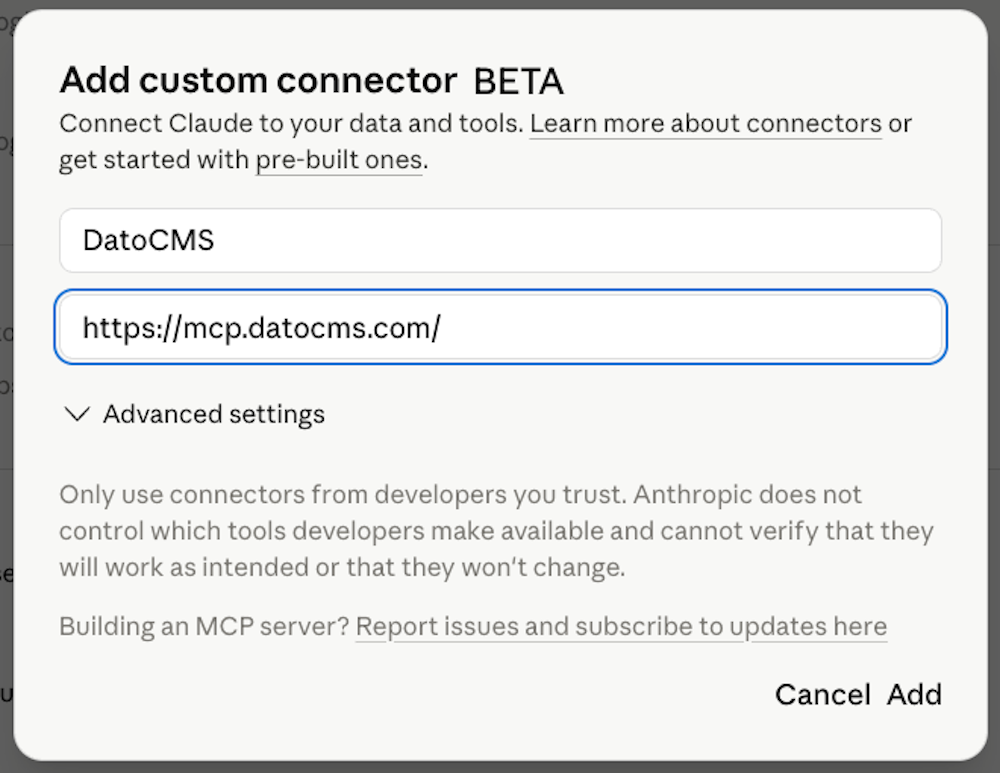
Once done, click Connect so you can authorize access through DatoCMS OAuth.
ChatGPT supports remote MCP servers through Developer Mode (currently in beta).
Enable Developer Mode at Settings → Apps → Advanced settings → Developer mode
Open Apps settings and click Create app next to Advanced settings
Enter a name (e.g.
DatoCMS), the MCP Server URLhttps://mcp.datocms.com, and leave Authentication set to OAuthClick Create
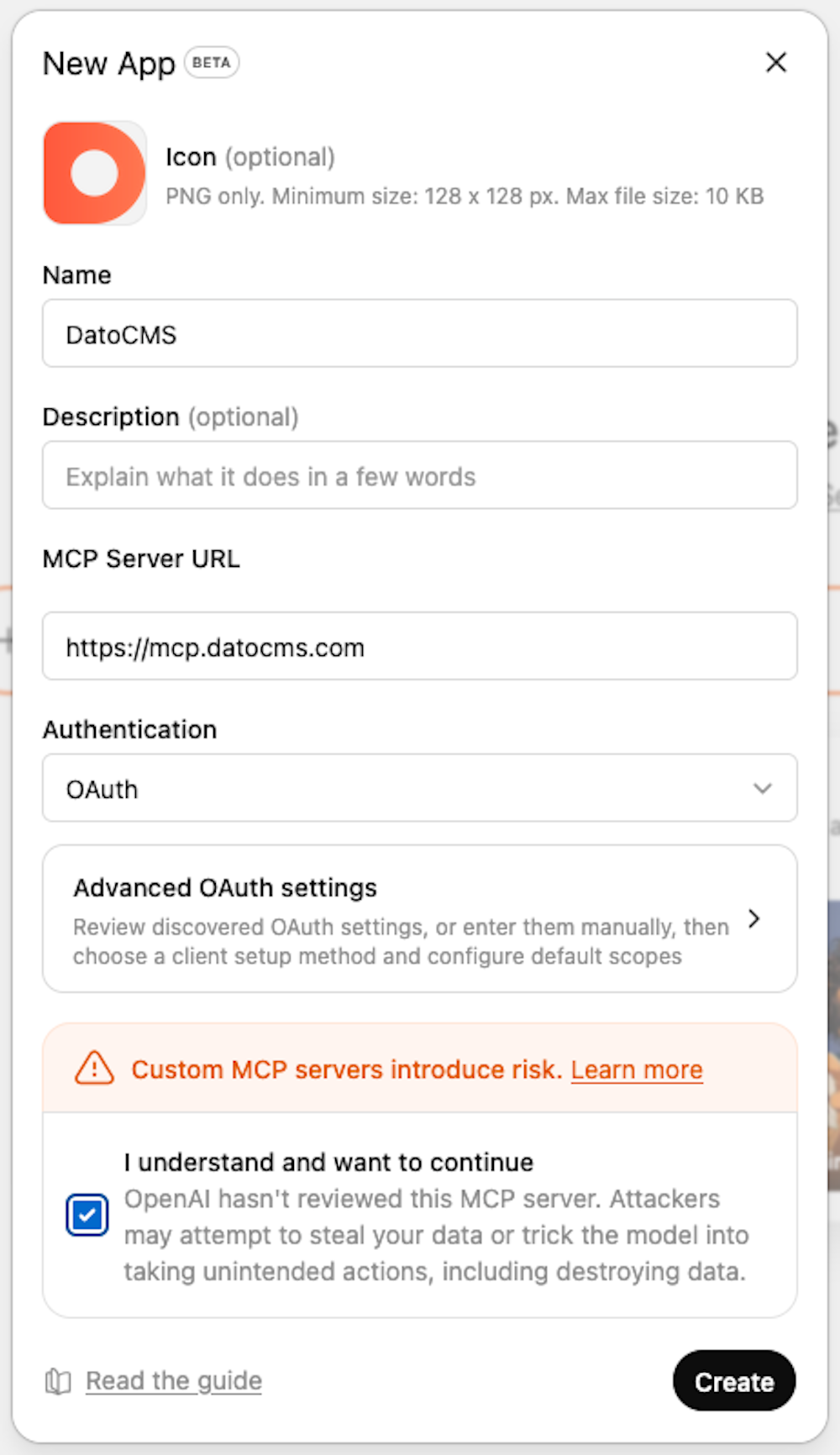
Once done, click Connect so you can authorize access through DatoCMS OAuth. The new app will appear in the composer's Developer Mode tool during conversations.
In Antigravity Settings → Customizations → Installed MCP Servers, click the Open MCP Config button (or directly open ~/.gemini/antigravity/mcp_config.json):
{ "mcpServers": { "DatoCMS": { "type": "http", "url": "https://mcp.datocms.com" } }}Add to ~/.codeium/windsurf/mcp_config.json:
{ "mcpServers": { "DatoCMS": { "serverUrl": "https://mcp.datocms.com" } }}How it works
Unlike traditional MCPs that expose every API endpoint, the DatoCMS MCP server takes a different approach designed to guide AI assistants through API interactions effectively.
Layered tools, not raw endpoints
DatoCMS has 40+ resources and 150+ API endpoints. Exposing all of them would overwhelm any LLM. Instead, we provide a small set of carefully designed tools organized in three layers (discovery → planning → execution) that guide the AI through a natural workflow:
Discovery & planning — Tools that explore what's available and load the documentation needed for execution:
search_projects: Search across every project in your account and organizations with fuzzy matchinglist_api_resources: List all available DatoCMS API resources grouped by themeget_api_methods: Batch-document any combination of resources, actions, and methods. Returns full TypeScript definitions and examples, and mints the verification tokens that the execution layer requiresget_schema: Retrieve detailed information about your content models, fields, relationships, and nested blocks
Execution layer (read-only) — These tools use a read-only API token. Most clients allow them to run without confirmation:
upsert_and_execute_safe_script: Write or patch a TypeScript script and execute it against a read-only clientview_script: View a previously stored script
Execution layer (read-write) — These tools use a full read-write API token. The user is asked to confirm before each use:
upsert_and_execute_unsafe_script: Write or patch a TypeScript script and execute it with full create/update/delete permissions
This layered structure reduces malformed API calls and forces the AI to commit to method names before writing code — every API call in a script must reference a verification token returned by get_api_methods.
Documentation-aware
Each documentation tool retrieves detailed method definitions and concrete examples from the official DatoCMS documentation. This is token-intensive, but it significantly improves success rates by giving the LLM the context it needs to make correct API calls.
Script-based execution
Instead of making one API call at a time, the DatoCMS MCP server enables AI assistants to write complete TypeScript programs that batch multiple operations to reduce round-trips and token overhead, provide full context for complex multi-step operations, support incremental editing when errors occur, and get type-checked before execution to catch errors early. Each script runs in an isolated runner on DatoCMS infrastructure, with restricted network access and a configurable timeout.
Performance & reliability
Real-world performance
When using Claude Code (our recommended client), users report:
Fast execution: Most common operations complete quickly without noticeable delays
High success rates: Operations like creating records, adding images, managing translations, and linking records work reliably
Minimal iteration needed: Most tasks succeed on the first attempt, with occasional minor refinements needed through follow-up prompts
No missteps: The layered approach effectively prevents malformed API calls
What to expect
Common operations (fast & reliable):
Creating records with content across multiple fields
Uploading and attaching images to records
Adding translations to existing content
Linking records together
Copying content between models
Listing and querying records
Complex operations (slower but functional):
Very complex operations like generating complete landing pages may take several minutes
Large batch operations involving many records
Schema modifications across multiple models
Token consumption
The documentation-aware approach retrieves full method documentation and examples for each operation. This consumes more tokens than traditional MCPs but significantly improves success rates. For most practical tasks, the token cost is acceptable given the reliability and accuracy of results.
Success tips
Results improve with:
Clear, specific prompts: "Create a blog post with title 'Hello' and attach the uploaded image" works better than "add a post"
Iterative refinement: If something is missing (like an image), a simple follow-up request handles it quickly
When it works best
The DatoCMS MCP server excels at:
Everyday content management tasks (creating, updating, translating records)
Complex multi-step operations that require understanding your content model
Tasks that would be tedious to do manually (bulk updates, content migration)
Operations that benefit from type safety and validation
Limits
Scripts that the AI executes on our runners are subject to the following limits. These values apply during the initial beta phase and may change as we gather usage data:
| Limit | Free plans | Paid plans |
|---|---|---|
| Maximum execution time per script | 20 seconds | 60 seconds |
| Monthly script execution time per account | 50 minutes | 400 minutes |
| Maximum output captured from a single script | 32 KB | 32 KB |
A few notes on what these mean in practice:
Per-script timeout: if a script takes longer than the limit it is terminated and the AI receives a friendly error. For long-running operations (large migrations, full-site translations) ask the assistant to split the work into smaller scripts.
Monthly time budget: every second a script spends running counts against the account's monthly budget. The budget resets at the start of each calendar month (UTC). Discovery and documentation tools (
get_api_methods,get_schema, etc.) do not consume execution time — onlyupsert_and_execute_safe_scriptandupsert_and_execute_unsafe_scriptdo.Output limit: scripts that produce more than 32 KB of
console.logoutput are truncated. If you need to inspect large datasets, ask the assistant to summarise the result rather than dumping it.
Security and Authentication
The DatoCMS MCP server is built around the principle that AI assistants generate untrusted code, and that code should never be able to escape its boundaries. Security is enforced at multiple layers.
Native MCP OAuth
There are no API tokens to copy, store, or rotate. The server authenticates through oauth.datocms.com using the standard MCP OAuth flow:
Tokens never touch your filesystem — your MCP client manages them
During the authorization step you can scope access to specific projects and define the level of access (details in the section below)
Tokens can be revoked at any time from your DatoCMS account settings; the server detects revoked or expired tokens and prompts a re-authentication
Single sign-on (SSO) accounts are not currently supported
Scope of permissions
The installation screen tells you who is asking for permissions. If the app you're installing isn't the one we've verified, the page says "Authorize an Unverified app" and highlights the destination in red, so you can stop and verify which app you're installing.

You also decide how much the app can do. Besides picking which projects the app can access, you can choose a level of access:
Only read content: read content and media, never write or edit anything.
Read and edit content (recommended for editors): the app can also create, publish, and delete content and media. It can do nothing on schema, settings, users, or API tokens.
Anything you can (recommended for devs): whatever your account can do in DatoCMS, the MCP can as well.
Whichever option you pick is still restricted by your own user permissions in each project. The MCP cannot perform actions that your role is unable to.
If you choose one access level, you can always revisit the config screen to edit this.
Isolated script execution
Every script the AI writes runs in an isolated runner, separate from any other user's session:
Network egress is restricted to DatoCMS APIs, your project's asset storage domain, and a whitelist of well-known image services (Unsplash, Pexels, Pixabay, Picsum)
Credential brokering: scripts never see your real API token. The runner transparently injects credentials at the network layer, so a script cannot exfiltrate them — even if it tried
Read-only enforcement: when the AI uses the safe script variant, the runner blocks any non-
GETrequest at the network layer, and the API itself rejects destructive operationsType-checking before execution: scripts are validated by the TypeScript compiler before they're allowed to run, catching errors before they reach the API
Per-script timeouts and monthly time budgets prevent runaway loops and abuse
Script validation
Beyond runtime isolation, scripts are statically analysed before execution and rejected if they:
Use
anyorunknowntype annotations (which would bypass type-checking)Cast through
never(a common TypeScript escape hatch)Include
@ts-ignore,@ts-expect-error, or@ts-nocheckcommentsCall API methods that the AI has not pre-declared via
get_api_methods(the verification token system)
Troubleshooting
Server not connecting
Verify your client supports remote MCP servers (Claude Code, Claude Desktop / Claude.ai via Connectors, ChatGPT via Developer Mode, Cursor, VS Code, Windsurf, and Antigravity all do)
Ensure your MCP client configuration uses the correct URL:
https://mcp.datocms.comRestart your IDE or client after configuration changes
Check that your firewall or corporate proxy allows outbound HTTPS to
mcp.datocms.comandoauth.datocms.com
Authentication issues
If your token has been revoked or expired, the server will prompt your client to re-authenticate; trigger any DatoCMS tool to start the flow
Use the
whoamitool to verify which DatoCMS account is currently signed inDuring OAuth authorization, double-check that you granted access to the projects you want the assistant to work with
To switch accounts, sign out from your MCP client (the exact step depends on the client) and trigger a fresh authentication
Script execution failures
If the script hits a timeout, ask the assistant to break it into smaller steps
If you've exceeded your monthly execution time budget, wait for the budget to reset or upgrade your plan
Performance issues
If operations are taking too long:
Break very complex tasks into smaller steps
Use more specific prompts to reduce exploration time
Check whether a simpler API method can achieve the same result
Feedback & Contributing
We value your feedback to improve the DatoCMS MCP server:
Share your experience: Let us know what works well and what doesn't
Report bugs and suggestions: Reach out at support@datocms.com — your feedback helps us identify common issues, improve documentation, and enhance the server's capabilities
If the AI runs into a bug or gap in our API documentation while using the server, it can use the built-in report_api_issue tool to send a structured report directly to our team.