Button Extended
DatoCMS plugin for advanced link and button management — supporting records, assets, URLs, telephone and email links with styling variants, icons, titles, aria-labels, nofollow and target control.
Button Extended for DatoCMS
A powerful DatoCMS plugin for advanced link and button management. Create fully configurable link fields with support for records, assets, URLs, telephone numbers and email addresses — including styling variants, icons, custom titles, aria-labels, nofollow and target control.
> Fork notice: This plugin is forked from Better Linking by Colin Dorr. It extends the original with additional features such as icon selection, nofollow control, a redesigned responsive grid layout, and has been migrated to Vite, React 19 and DatoCMS Plugin SDK v2. Full credit to Colin Dorr for the original plugin concept and implementation.
Features
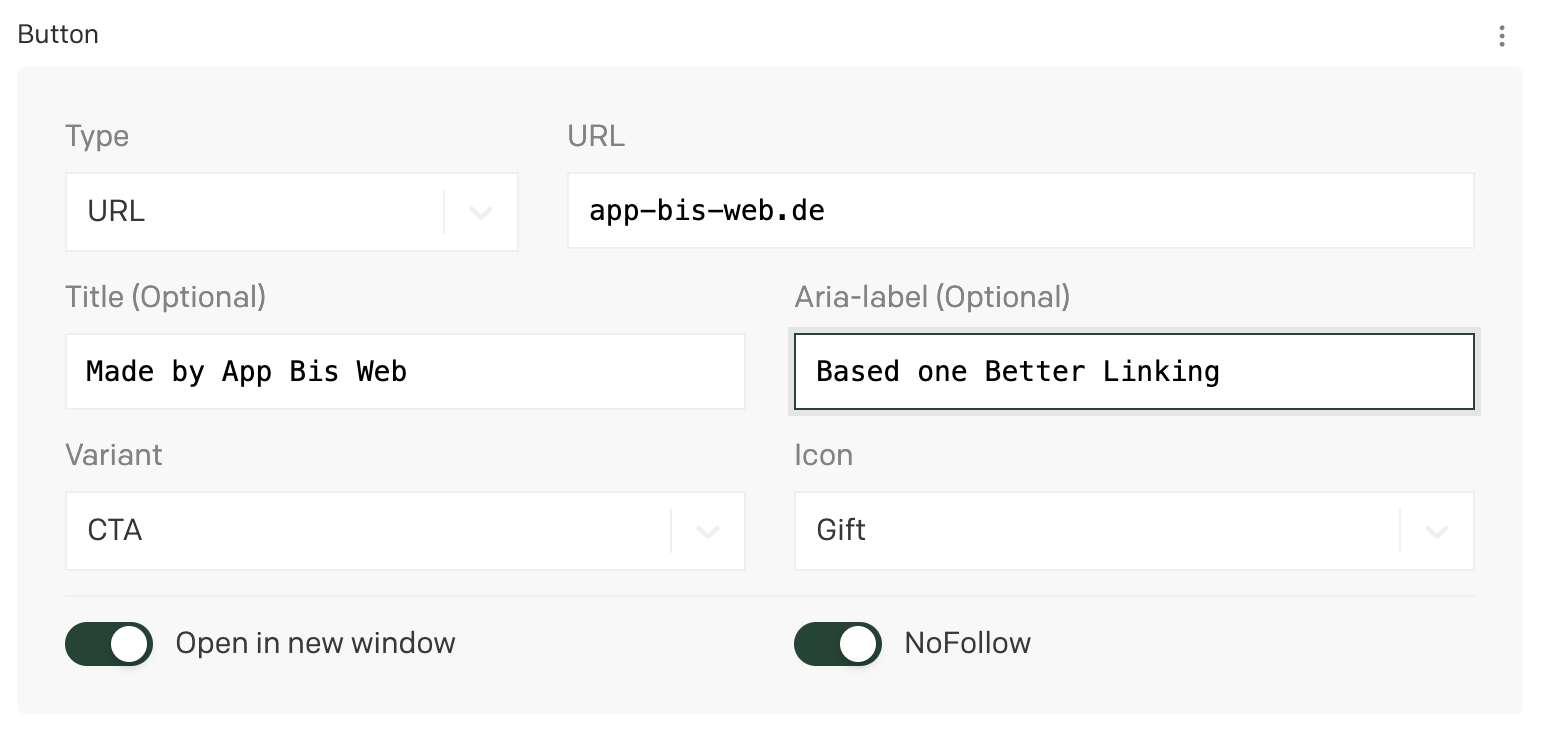
- Multiple link types — Records, Assets, URLs, Telephone numbers, Email addresses
- Styling variants — Define custom CSS class variants (e.g. CTA, Secondary, Outline) in global or field-level settings
- Icon selection — Configure icon options per styling variant, selectable by editors
- Title override — Optional custom link text
- Aria-label — Dedicated accessibility label for screen readers
- Open in new window — Target
_blanktoggle - NoFollow — Conditional
rel="nofollow"toggle (appears when "Open in new window" is active) - Responsive grid layout — Clean 2-column layout that collapses on narrow containers
- Per-field configuration — Override global plugin settings on individual fields
- Structured JSON output — Full data object with a convenient
formattedsummary for GraphQL queries
Installation
- Install the plugin from the DatoCMS Marketplace or add it as a private plugin.
- Go to the plugin settings and configure Link Settings, Styling Settings and Icon Settings. These values will serve as defaults for all link fields.
- Create a new JSON field on a model.
- Under Presentation, choose the Button Extended appearance.
- Optionally override the default Link, Styling and Icon settings per field in the field appearance configuration.
- Save and start using the field.
GraphQL Response
When querying a Button Extended field via GraphQL, the full JSON object is returned. The most useful part is the formatted object, which contains a clean summary of the link configuration:
{ "formatted": { "isValid": true, "type": "url", "text": "Made by App Bis Web", "ariaLabel": "Based on Better Linking", "url": "app-bis-web.de", "target": "_blank", "rel": "nofollow", "noFollow": true, "class": "cta", "icon": "gift" }}Unconfigured buttons
Button fields are optional. When no link type is selected, the field stores null instead of a JSON object. This keeps the record payload minimal — especially important for multilingual records with multiple button fields that can quickly approach the DatoCMS 300 KB record size limit.
Make sure your frontend code handles this gracefully:
const button = JSON.parse(rawButtonField);if (!button?.formatted?.isValid) return null;Formatted fields
| Field | Type | Description |
|---|---|---|
isValid | boolean | Whether the link has both a URL and text |
type | string | Link type: record, asset, url, tel, or email |
text | string | Display text (custom title or fallback from link data) |
ariaLabel | string | Accessibility label |
url | string | The resolved URL. Omitted when not set |
target | string | _blank or _self |
rel | string | "nofollow" when enabled. Omitted otherwise |
noFollow | boolean | Whether nofollow is active |
class | string | CSS class from the selected styling variant. Omitted when not set |
icon | string | Icon identifier from the selected icon option. Omitted when not set |
Full response example
Click to expand full JSON response
{ "linkType": { "label": "URL", "value": "url" }, "stylingType": { "label": "CTA", "value": "cta", "allowIcons": true }, "iconType": { "label": "Gift", "value": "gift" }, "url": { "title": "URL", "url": "app-bis-web.de" }, "formatted": { "isValid": true, "type": "url", "text": "Made by App Bis Web", "ariaLabel": "Based on Better Linking", "url": "app-bis-web.de", "target": "_blank", "rel": "nofollow", "noFollow": true, "class": "cta", "icon": "gift" }, "custom_text": "Made by App Bis Web", "aria_label": "Based on Better Linking", "open_in_new_window": true, "nofollow": true, "isValid": true}Upgrading to v1.1.0
Version 1.1.0 optimizes the stored JSON payload. This is fully backward compatible:
- Existing configured buttons are unchanged and continue to work as before.
- Unconfigured buttons will be migrated to
nullthe next time an editor saves the record, freeing up space. - Frontend code that already uses null-safe access (e.g.
button?.formatted?.url) requires no changes. If your code checks for=== nullon fields likerel,classoricon, update it to use a falsy check (!button.formatted.rel) since these properties are now omitted rather than set tonull.
Compatibility
| Dependency | Version |
|---|---|
| DatoCMS Plugin SDK | v2.x |
| DatoCMS React UI | v2.x |
| React | 19.x |
| Vite | 8.x |
| TypeScript | 5.x |
| Node.js | >= 20 |
Development
npm installnpm run devThe dev server starts at http://localhost:5173. Add this URL as the entry point in your DatoCMS private plugin settings.
npm run build # Production build (outputs to dist/)npm test # Run testsCredits
This plugin is based on Better Linking by Colin Dorr. The original plugin provided the foundation for link type management, styling variants, custom text, aria-labels and target control within DatoCMS.
Button Extended builds on top of this by adding:
- Icon selection dimension with per-variant configuration
- NoFollow (
rel="nofollow") toggle - Redesigned responsive 2-column grid layout
- Migration from Create React App to Vite
- Upgrade to React 19 and DatoCMS Plugin SDK v2
- Lucide Icons (locally bundled, no CDN)
- Improved type safety and error handling
Author
Jan Luther — app-bis-web.de
License
This project is licensed under the GNU General Public License v3.0.