Centra DatoCMS Official Plugin
Select Centra products, variants, and SKU items from DatoCMS
Centra for DatoCMS
Select Centra products, exact product variants, and buyable SKU/size items directly from DatoCMS records.
Centra remains the source of truth for catalog data. The plugin stores only stable reference IDs in DatoCMS and loads names, media, prices, availability, stock, SKU values, and other product details live from Centra.
- Product picker restricted to each display's primary variant
- Exact product-variant picker
- SKU/size picker backed by Centra
ItemIDs - Single and ordered multiple selections
- Product-first search with SKU, size, product-number, variant, and GTIN discovery
- Live product cards with unresolved and availability states
- Light and dark mode support through DatoCMS UI tokens
Configuration
Open the plugin settings and enter:
- Storefront API URL — the complete Centra no-session GraphQL URL.
- API token — a read-only token for that endpoint.
Select Save and connect. The plugin validates the credentials by loading one catalog page before saving. The same Centra connection is used in every DatoCMS environment.
Adding a Centra field
- Create a DatoCMS JSON field.
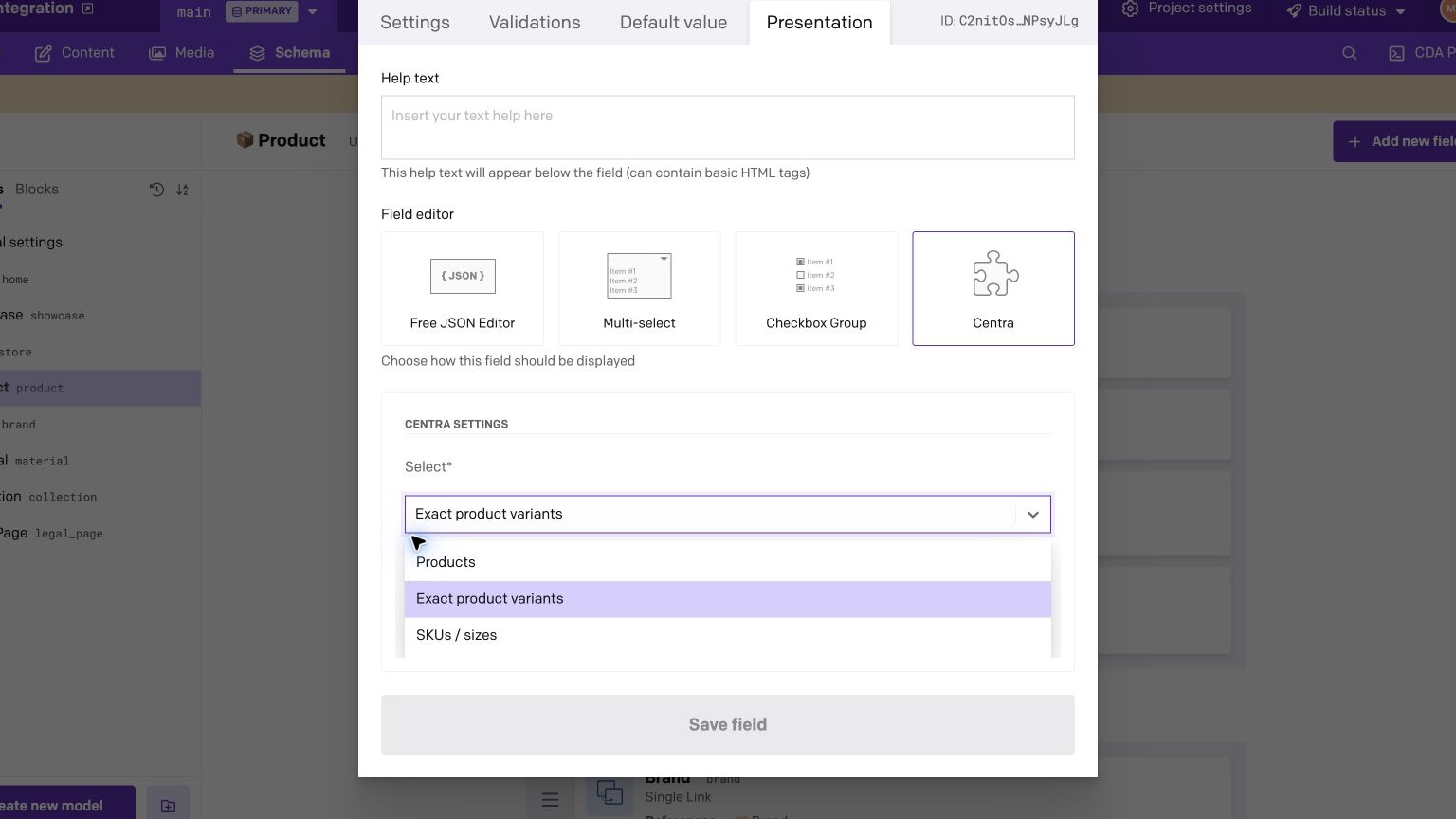
- In the field's Presentation settings, choose Centra.
- Choose the reference kind:
- Product (primary variant) — browse one primary DisplayItem per product display.
- Exact variant — browse every DisplayItem/product variant.
- SKU / size — choose a nested Centra Item.
- Choose Single or Multiple cardinality.
Changing a populated field to an incompatible kind or changing a multi-value field with several references to single cardinality does not discard or reinterpret data. The editor asks for an explicit clear or replacement.
Editor workflow
Choose what editors can select
Configure the JSON field for products, exact product variants, or individual SKU/size items.
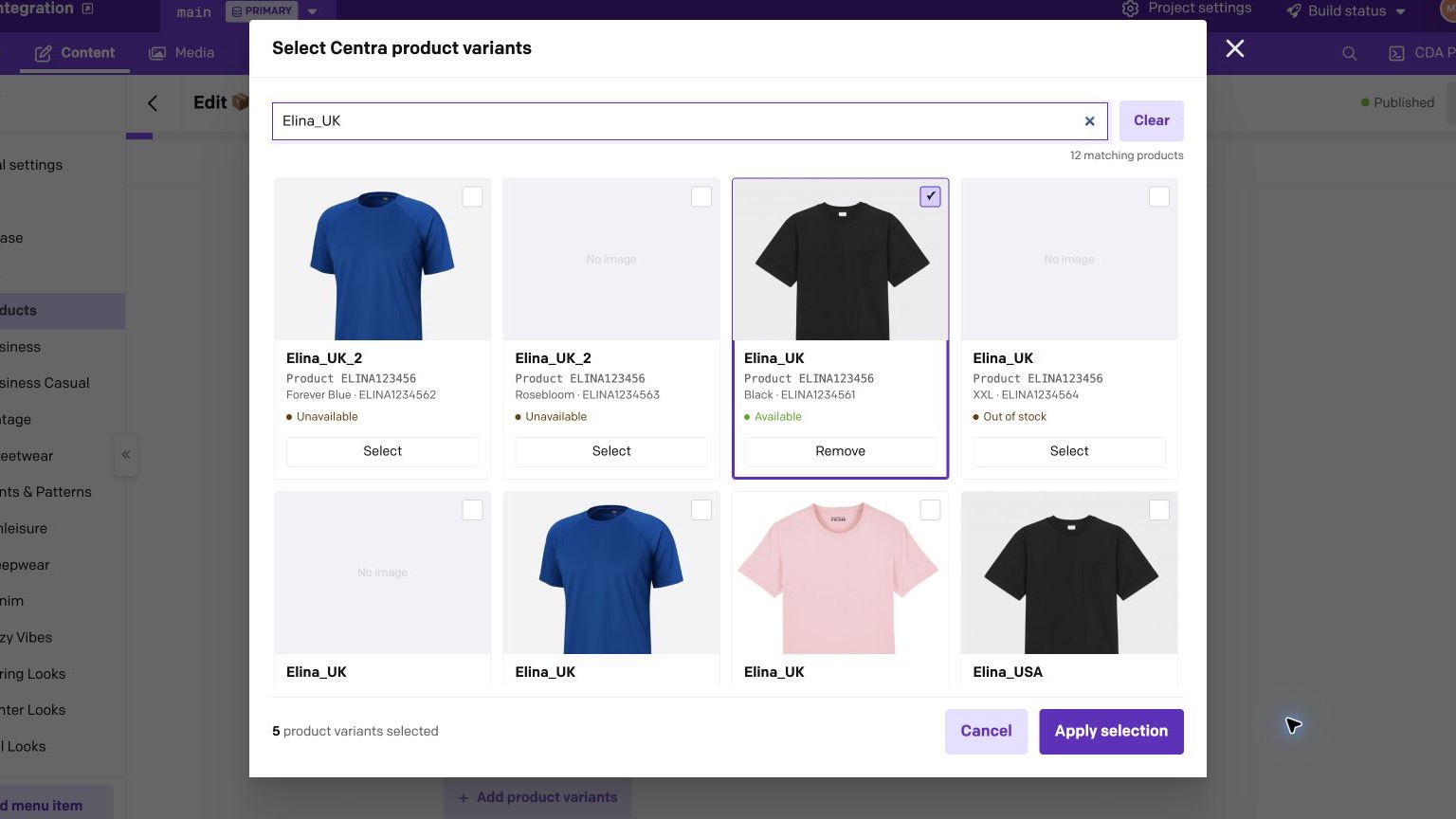
Search and select exact variants
Search the live Centra catalog, compare image-backed variants, and stage one or more selections before applying them.
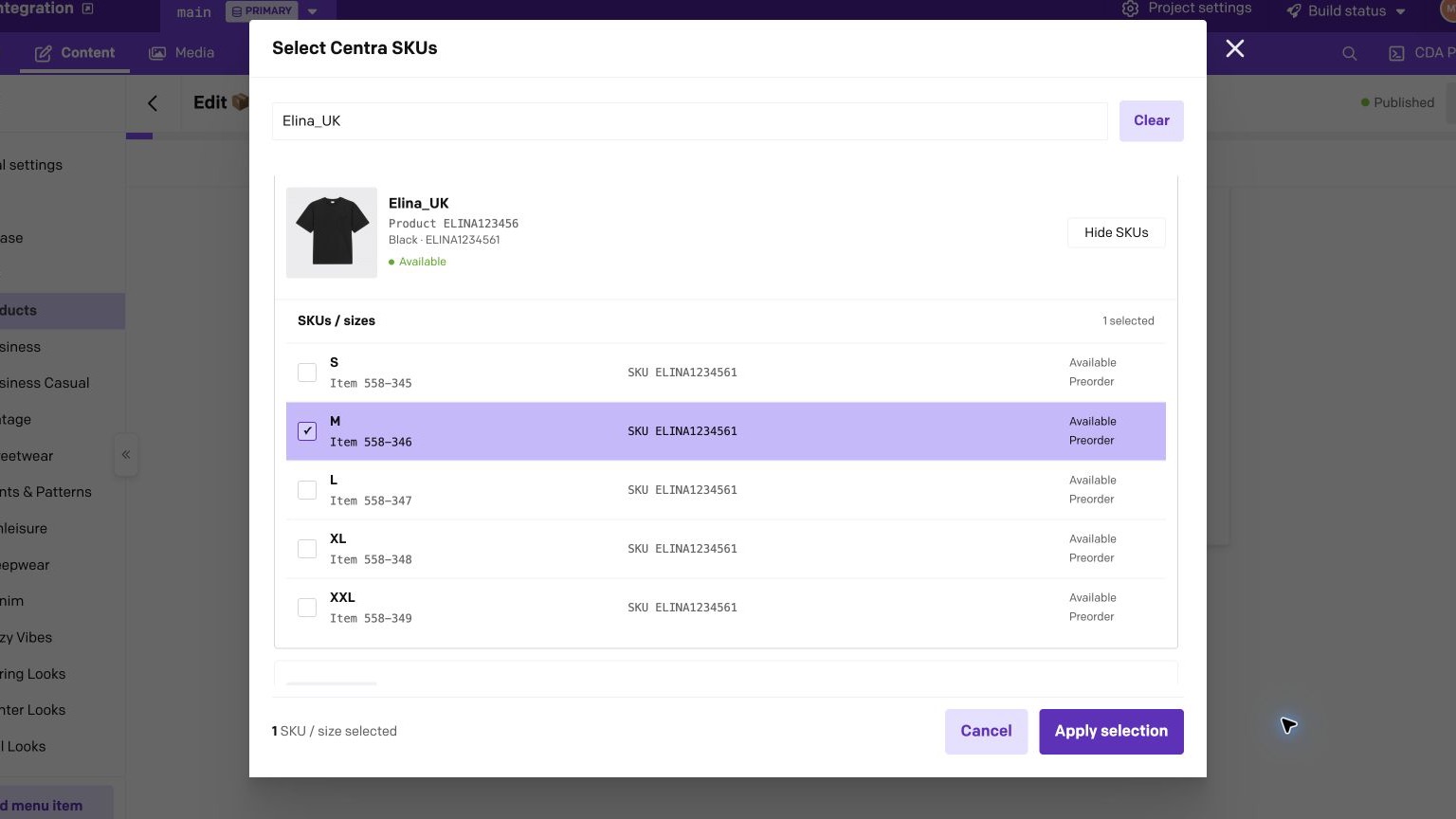
Select a specific SKU or size
Expand a product variant and select the exact Centra Item. Repeated SKU strings remain separate rows with their own size and Item ID.
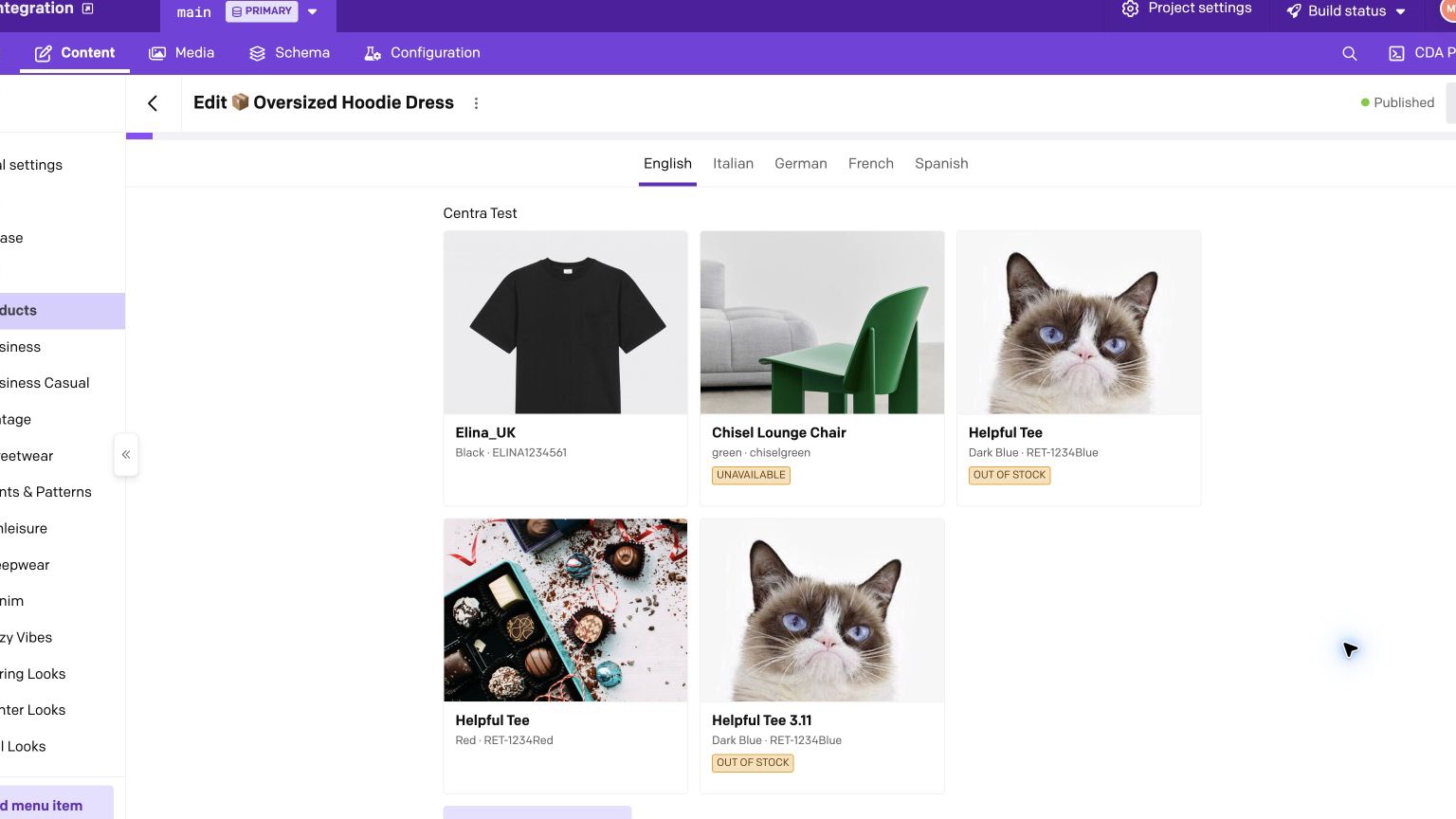
Work with hydrated references
Saved references are rendered with current Centra images, variant details, and availability while the JSON value keeps only stable IDs.
Stored value contract
The JSON field contains a versioned document. null is the only empty value.
One product
{ "version": 1, "kind": "primaryProduct", "references": [{ "displayItemId": 2752 }]}Ordered product variants
{ "version": 1, "kind": "variant", "references": [ { "displayItemId": 2752 }, { "displayItemId": 2810 } ]}One SKU/size item
{ "version": 1, "kind": "item", "references": [ { "displayItemId": 2752, "itemId": "opaque-centra-item-id" } ]}The plugin intentionally does not store product names, URIs, images, prices, stock, SKU strings, GTINs, or full product snapshots. Those values can change in Centra and are loaded live.
Resolving references in a frontend
Query the JSON field from DatoCMS using its API key. The Content Delivery API returns the field as a JSON-encoded string, or null when the field is empty. Replace centraProducts below with your field's API key.
query ProductPage { product { centraProducts }}The response contains a string rather than a parsed reference document:
{ "data": { "product": { "centraProducts": "{\"version\":1,\"kind\":\"variant\",\"references\":[{\"displayItemId\":2752}]}" } }}Parse the field before reading its references:
type CentraReferenceDocument = | { version: 1; kind: 'primaryProduct' | 'variant'; references: { displayItemId: number }[]; } | { version: 1; kind: 'item'; references: { displayItemId: number; itemId: string; }[]; };
function parseCentraField( rawValue: string | null,): CentraReferenceDocument | null { if (rawValue === null) return null;
// Add runtime validation for the version, kind, and reference shape // before using this data in production. return JSON.parse(rawValue) as CentraReferenceDocument;}
const document = parseCentraField(data.product.centraProducts);const displayItemIds = [ ...new Set( document?.references.map(({ displayItemId }) => displayItemId) ?? [], ),];After parsing the DatoCMS value, fetch the referenced DisplayItems from Centra using those numeric IDs:
query ResolveCentraReferences( $displayItemIds: [Int!] $market: [Int!] $pricelist: [Int!] $languageCode: [String!]) { displayItems( where: { id: $displayItemIds } limit: 100 market: $market pricelist: $pricelist languageCode: $languageCode ) { list { id name productNumber isPrimaryVariant available hasStock productVariant { id name number } items { id name sku GTIN preorder stock { available } } } }}Centra may return DisplayItems in a different order. Reorder them using the parsed references array, and keep a placeholder for any missing DisplayItem instead of silently dropping the saved reference.
SKU behavior
For a field configured for SKUs/sizes, parsing the DatoCMS JSON string produces a document with kind: 'item'. Each reference contains the parent DisplayItem ID and the exact nested Centra Item ID:
const document = parseCentraField(data.product.centraSkus);
if (document?.kind === 'item') { const displayItemsById = new Map( displayItems.map((displayItem) => [displayItem.id, displayItem]), );
const resolvedSkus = document.references.map((reference) => { const displayItem = displayItemsById.get(reference.displayItemId); const item = displayItem?.items.find(({ id }) => id === reference.itemId) ?? null;
return { reference, displayItem, item }; });}In this example, displayItems is the list returned by the Centra query above. Mapping over the parsed references array preserves the editor-defined order. Keep entries with a missing displayItem or item visible in your application rather than silently dropping them.
SKU and GTIN values are searchable display metadata, not identity. Centra catalogs can contain duplicate SKU values, even within the same DisplayItem, so frontend code must not resolve a selection by SKU or GTIN. The stable identity is the stored displayItemId and itemId pair.
Availability and stock
Market, pricelist, language, and Centra allocation rules can change what is visible or available. Product and item stock shown in DatoCMS is the current Storefront API response, not a guarantee that checkout will succeed later.
Missing or inactive references remain visible in the field editor with their stored IDs so editors can remove or replace them deliberately.
Troubleshooting
Connection test fails
- Confirm the URL is the complete no-session GraphQL endpoint.
- Confirm the bearer token belongs to the same Storefront API plugin.
- Avoid using the AMS URL as the API endpoint.
- Inspect the HTTP or GraphQL error shown by the plugin; credentials are redacted from messages.
Prices or translations differ from the Centra backoffice
The plugin uses the market, pricelist, and language defaults exposed by the configured no-session endpoint. Adjust those defaults in Centra if the catalog response is not the one editors should browse.
A primary product now shows a warning
The selected DisplayItem is pinned. If Centra later assigns another primary variant, the plugin warns and leaves the existing reference untouched. Replace it explicitly if the content should follow the new primary choice.