Converter Studio
Convert HEIC and RAW photos, TIFFs, Office documents and videos in the Media Area into JPG, WebP, AVIF, PDF, MP4 or text with Converter Studio.

Converter Studio for DatoCMS
Convert the files DatoCMS cannot show as they are (iPhone HEIC photos, camera RAW, TIFF scans, Word, PowerPoint and Excel documents, MOV and other videos) into JPG, WebP, AVIF, PDF, MP4 or plain text, without leaving the Media Area. The conversions run on Converter Studio, with your Converter Studio account's credits.
What it does
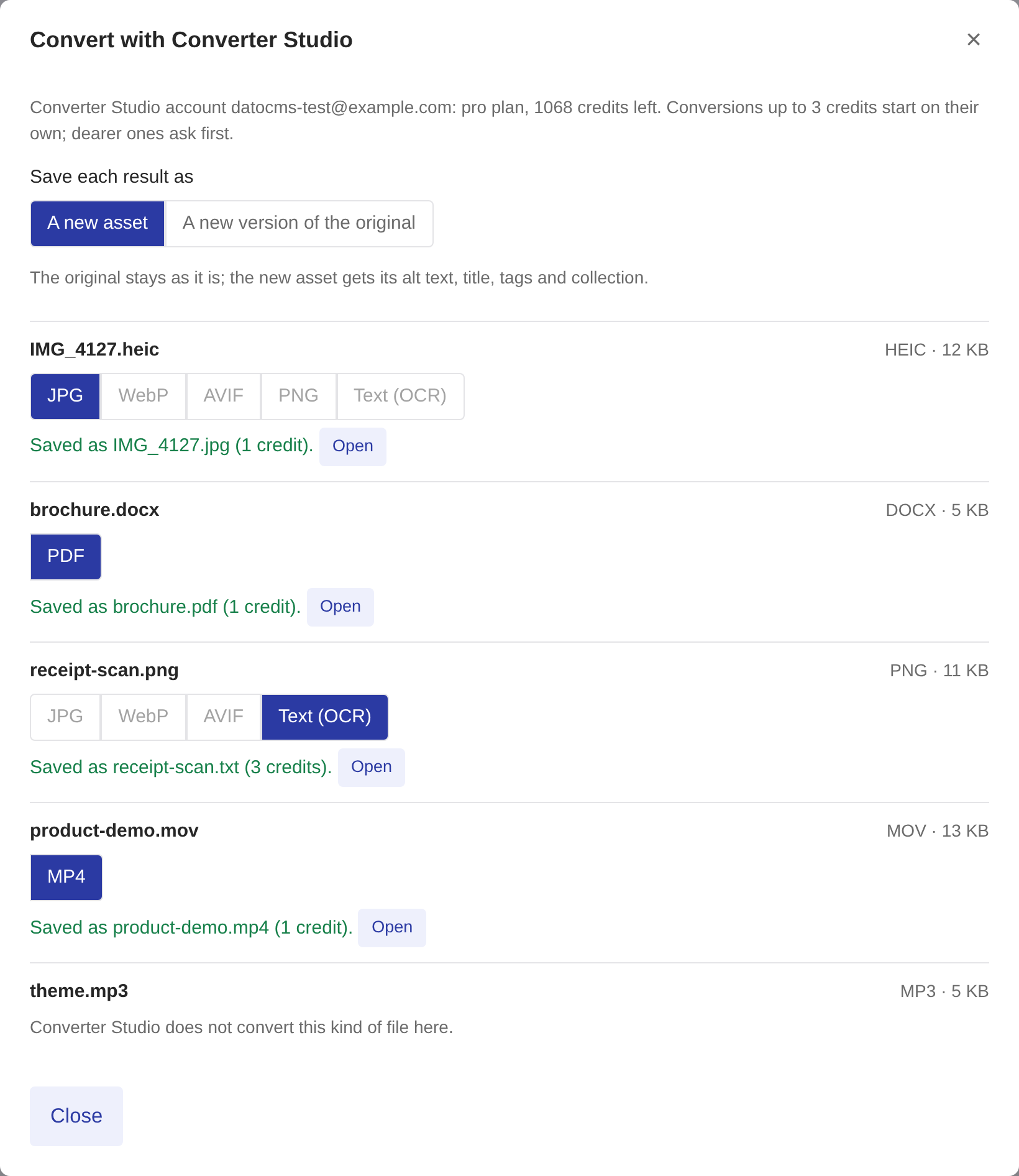
Select assets in the Media Area (or open one) and choose Convert with Converter Studio… in the actions menu. For each asset, pick what it becomes:
| Asset | Can become |
|---|---|
| HEIC/HEIF, TIFF, BMP, GIF, AVIF, WebP, PNG, JPG | JPG, WebP, AVIF, PNG |
| Camera RAW (DNG, CR2, NEF, ARW) | JPG, WebP, PNG |
| A photo or scan with text (JPG, PNG, WebP, HEIC, TIFF, BMP) | its text, as a TXT file (OCR) |
| SVG, Illustrator (AI), EPS | PNG, JPG (and WebP from SVG) |
| Word, PowerPoint, Excel, OpenDocument, RTF, TXT, HTML | |
| a smaller PDF, or its text (OCR for scanned pages) | |
| MOV, MKV, AVI, WMV, FLV, 3GP, WebM | MP4 |
Only what Converter Studio's server offers for a format is shown (no AVIF from BMP, for example), and the best choice is selected first. Then choose where each result goes:
- A new asset (the default): the original stays as it is. The new asset gets the original's alt text and title in every locale, its custom data, author, copyright, notes, tags and collection (and its focal point, between two images).
- A new version of the original: DatoCMS's own "new version" of an asset. The asset keeps its ID and metadata, so every record that uses it shows the converted file. This is offered only for the same kind of file (a photo for a photo, a video for a video, a PDF for a document); text from OCR is always saved as a new asset. If the asset changed while it was being converted, it is not replaced.
The dialog converts the assets one after the other and shows each result; Open shows the saved asset. Converter Studio downloads each asset from DatoCMS's CDN by its URL; nothing is uploaded from your computer, and the result comes back to your browser to be saved in the Media Area.
Install and set up
- In your project: Configuration → Plugins → Add new plugin, search for
"Converter Studio" and install it. DatoCMS asks you to grant the
currentUserAccessTokenpermission: the plugin needs it to save results in the Media Area as you (see "Privacy and security"). - Create a Converter Studio account (free accounts get 13 credits a day) and an API key on your account page.
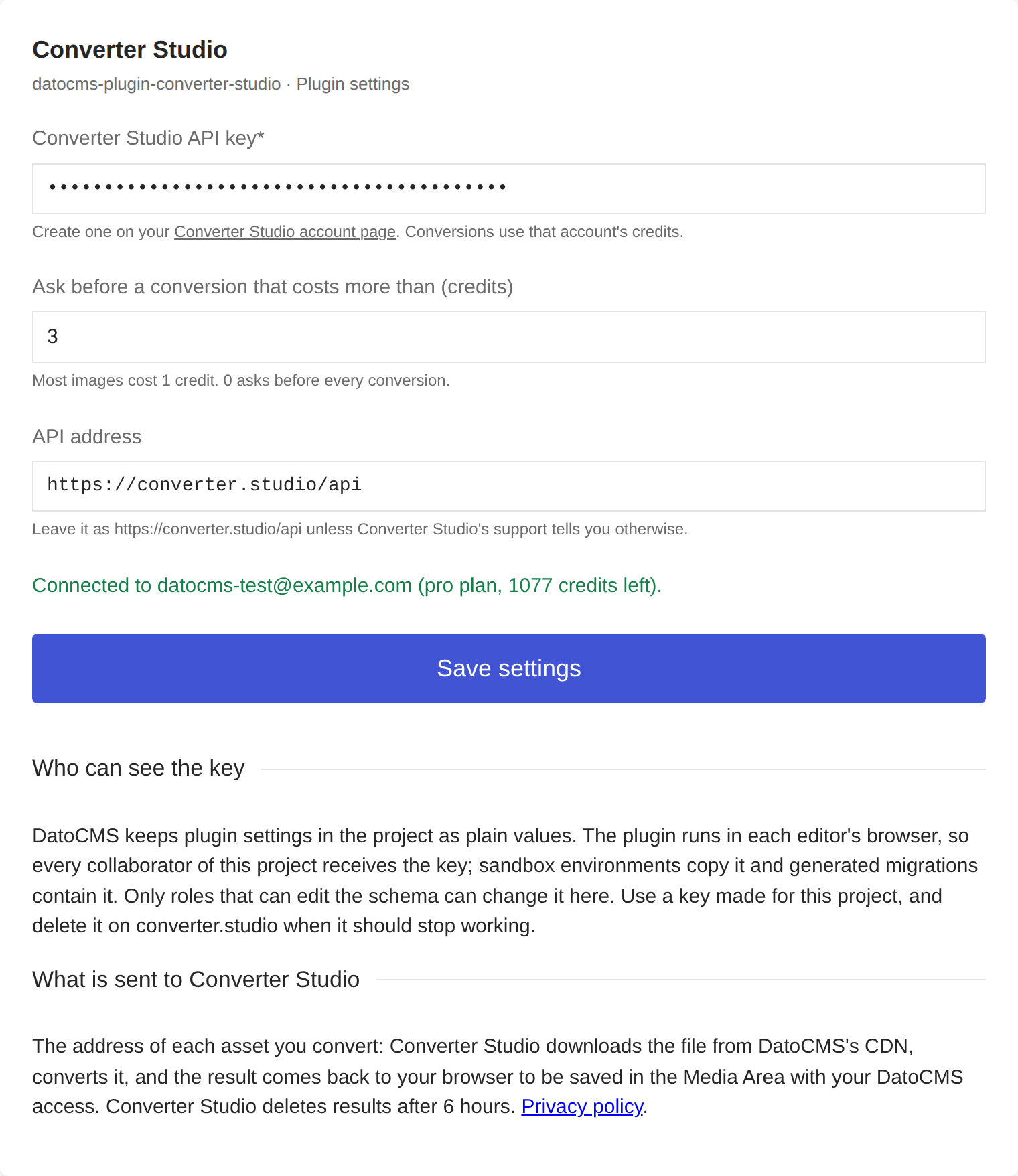
- In the plugin's settings, paste the key and press Save settings. The plugin checks the key with Converter Studio before saving and shows the account it belongs to.
Settings:
- Converter Studio API key: the account whose credits the conversions use.
- Ask before a conversion that costs more than (credits): 3 by default. Most images cost 1 credit; videos and long documents can cost more. Dearer conversions ask first, and a declined price costs nothing. 0 asks every time.
- API address: leave it as
https://converter.studio/api.
Prices and plans: converter.studio/pricing.
Limits
- One asset in, one file out; up to 25 assets per dialog, converted one after the other. Keep the dialog open until it finishes.
- Converter Studio must be able to download the asset at its DatoCMS URL (DatoCMS's assets are public by default).
- File sizes and media length follow your Converter Studio plan; your DatoCMS plan's limits apply to the saved files.
- A new version gets a new URL from DatoCMS. Records and DatoCMS's APIs use it at once; a link copied somewhere else still points at the old address.
- The plugin's screens are in English.
Privacy and security
- What is sent to Converter Studio: the URL of each asset you convert and the format you chose. Converter Studio downloads the file, converts it, and deletes results after 6 hours. See the privacy policy.
- Where the API key is kept: in the plugin's settings. DatoCMS stores plugin settings as plain values: every collaborator of the project receives them in the browser (the plugin runs there), sandbox environments copy them, and generated migrations contain them. API tokens without permission to edit the schema do not receive them, and only roles that can edit the schema can change them. Use a key made for this project and delete it on your Converter Studio account page when it should stop working.
- What the plugin may do in DatoCMS: with
currentUserAccessTokenit acts as the editor who uses it, with that editor's role: it reads the chosen assets, creates new assets and replaces files, and nothing else. An editor whose role cannot add assets gets DatoCMS's refusal. - The plugin calls Converter Studio's API from your browser, from DatoCMS's plugin address
(
https://plugins-cdn.datocms.com). Requests carry no cookies, and the key is never logged.
Development
npm ci # Node 22.12 or laternpm test # unit and component tests (Vitest, jsdom): no networknpm run typechecknpm run build # dist/, which DatoCMS loads (datoCmsPlugin.entryPoint)npm run dev # Vite on http://localhost:5173, for a private plugin's entry pointThe Converter Studio API answers browsers only from the origins it lists. A development copy
served from localhost can use the DatoCMS side as usual, but its calls to
converter.studio are refused until that origin is allowed.
Support
Questions and problems: support@converter.studio or GitHub issues. More about the API: converter.studio/developers.
License
MIT, © Converter Studio.