Grafo
Record relations of a DatoCMS project as an interactive graph, filtered by model, status and relation field, with role-aware loading.
Grafo
DatoCMS plugin that draws the records of a project and the links between them as an interactive graph. It adds a Grafo tab to the main navigation. Each node is a record, and clicking a node shows its incoming and outgoing relations and opens the record in the editor.
Website: <https://spleenteo.github.io/grafo-datocms-plugin/>
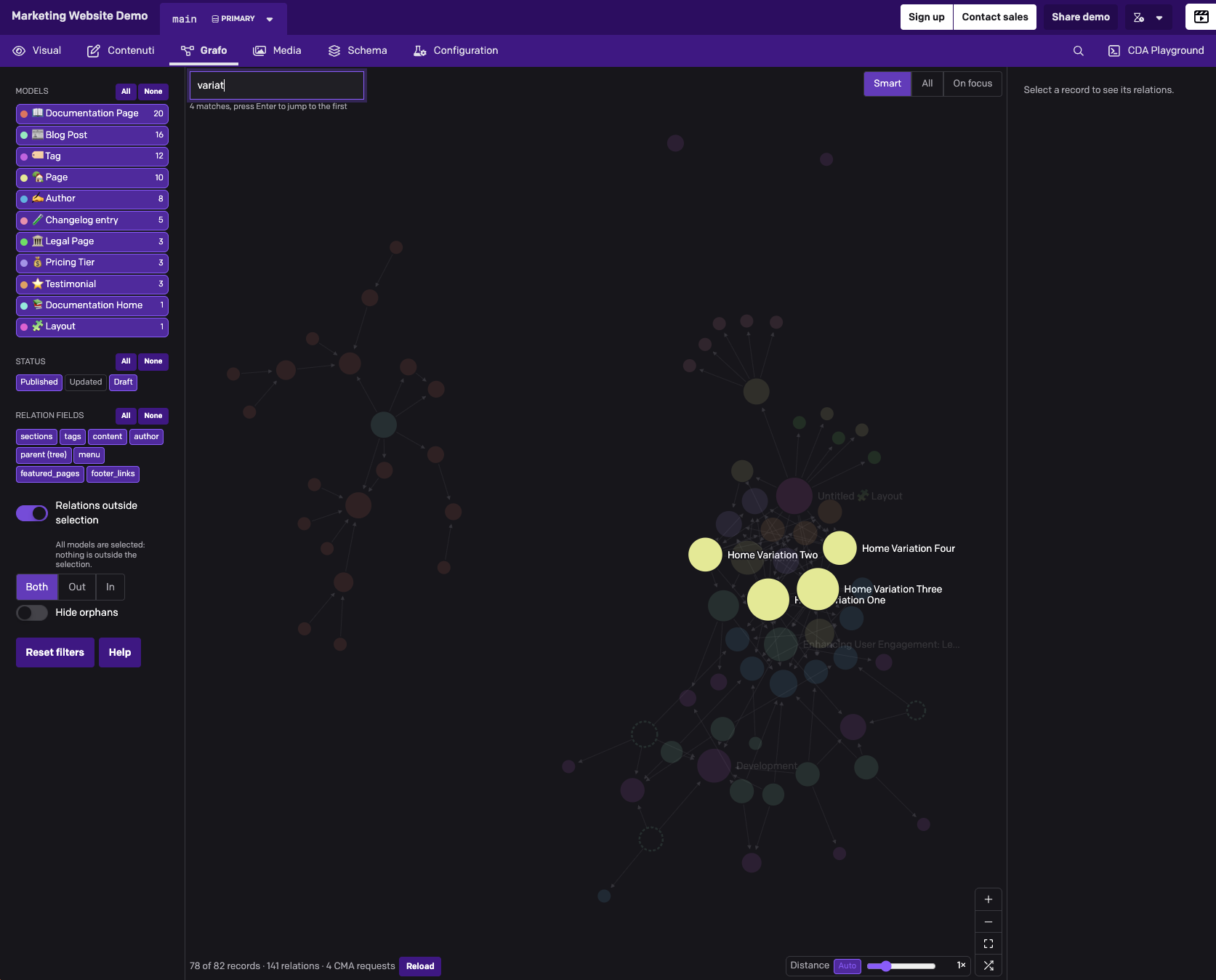
Demo video: assets/preview.mp4
What it shows
- Nodes. One node per record. The colour stands for the model. The area grows with the record's total number of relations, relative to the most-connected visible record.
- Edges. An edge goes from the record that holds the link to the linked record. Grafo reads relations from
linkandlinksfields, from Structured Text (itemLink,inlineItem, blocks and inline blocks), from Modular Content and from single-block fields, following nested blocks to any depth. - Links inside blocks. They count for the record's top-level field that holds the block.
- Tree models.
parent_idappears as a pseudo field namedparent (tree). - Status. A ring marks a published record with unpublished changes. A dashed outline marks a draft. Grafo reads the current version, which is what editors see.
- Context nodes. These are records of models outside the selection that link to the selected models, or that the selected models link to. They are drawn faded with an italic label. The "Relations outside selection" switch controls them, with three directions: Both, Out, In.
Features
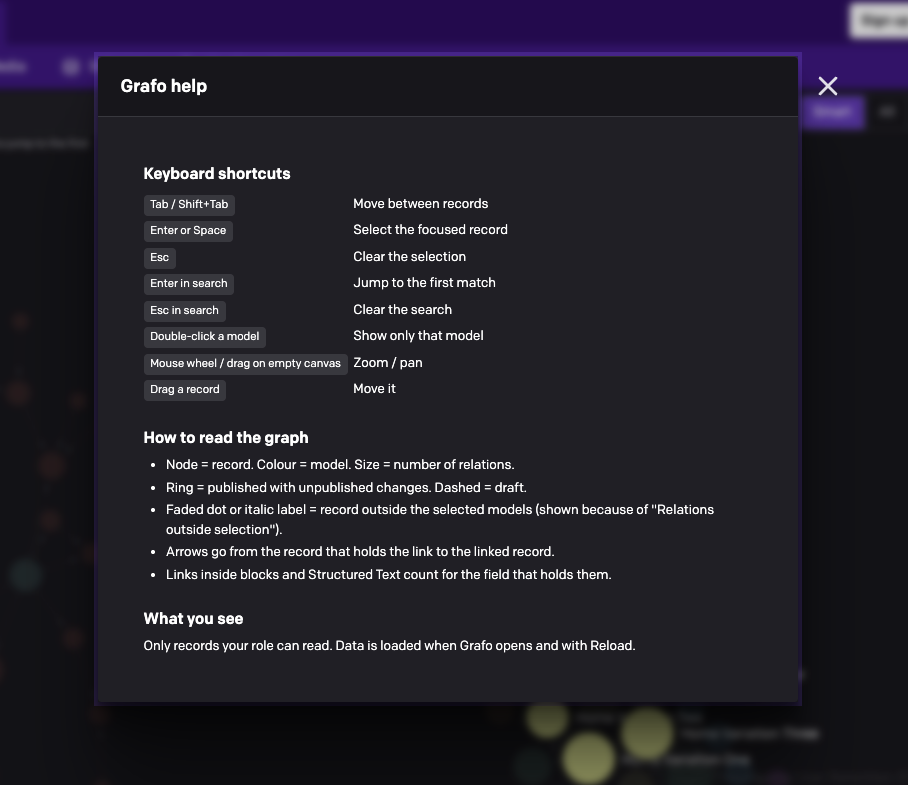
- Filter rail. Filter by model, status and relation field, with All/None per group. Double-click a model to show only that one. You can also hide orphans and reset the filters.
- Inspector. Shows the model, title and status, an Open record button, and the outgoing and incoming relations. At the bottom it lists the creation, last update and publication dates and the creator.
- Selection. Selecting a record expands the view with all of its relations and centres the camera on it and its neighbours. From there you can walk from one record to the next.
- Search by title. Shows the match count; Enter jumps to the first match.
- Labels. Three modes: Smart, All, On focus.
- View controls. Zoom, fit, rearrange layout, and node distance. Distance is set automatically from the visible node count and canvas size, and can be overridden by hand.
- Reload. Reloads the data and keeps filters, selection, layout and zoom.
- Keyboard. Tab moves between records, Enter or Space selects, Esc clears the selection. A Help modal lists every shortcut.
- Theme. Follows the CMS light or dark theme.
Installation
From the DatoCMS marketplace: Configuration → Plugins → Add new → search "Grafo" → Install.
When you install, grant the currentUserAccessToken permission (see below). Without it the page shows a message and loads nothing.
Configuration
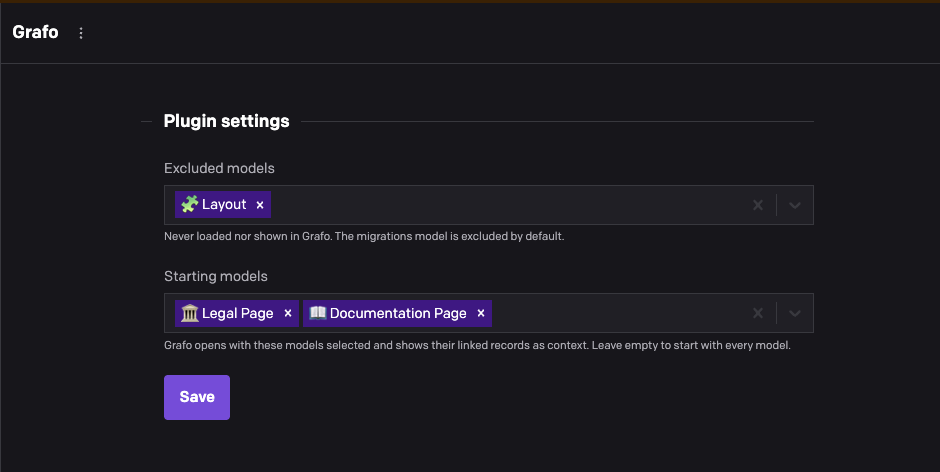
Open the settings from Configuration → Plugins → Grafo. Only roles that can edit the schema can save them; other roles see them read-only.
| Setting | Parameter | Default | Effect |
|---|---|---|---|
| Excluded models | excludedModelApiKeys: string[] | ["schema_migration"] | These models are never requested from the API and never shown. The default covers the model DatoCMS creates when you use migrations. Saving an empty list excludes nothing. |
| Starting models | startingModelApiKeys: string[] | [] (every model) | The models selected when Grafo opens, with "Relations outside selection" on, so their linked records appear as context. Reset returns to them. |
Both lists store model API keys, so they carry over to sandbox environments. A model that is renamed or deleted drops out of the list the next time you save.
Permissions and data access
Grafo reads data through the Content Management API using ctx.currentUserAccessToken. Every request runs with the permissions of the logged-in user, so each role sees only what it is allowed to read:
- Readable models. Grafo works them out from
ctx.currentRole.meta.final_permissions, so it doesn't need an extra request. Models the role can't read never reach the graph, the rail, the counts or the inspector. - Full-read roles (every model, any creator, no workflow or stage restriction) get flat listings: records and blocks at 500 per page.
- All other roles get nested listings, with blocks embedded in their records, at 30 per page. Blocks are never listed on their own, so the page never downloads blocks that belong to records the role can't read. Unknown or malformed permission entries count as restricted.
- Excluded models are removed after the read-access check, so excluding a model can never promote a role to full read.
The plugin makes no write calls.
Requests per load
| Role | Requests |
|---|---|
| Full read | 1 + max(1, ceil(records / 500)) + max(1, ceil(blocks / 500)) |
| Restricted | 1 + max(1, ceil(records / 30)) |
Each listing is repeated per chunk of 200 models, with at least one request per chunk. The count shown in the status bar is API calls, rate-limit retries included.
The first request fetches the schema: site with include=item_types,item_types.fields. The results are memoised for the page session, keyed by environment, endpoint, user, effective permissions and excluded models. Reload bypasses the memo. The schema, meaning model and field names, is always downloaded.
Stored state
The editor's filters are saved in localStorage under grafo:filters:v1:<siteId>:<environment>:<userType>:<userId>. Filters are stored by model and field API key, with switched-off models and fields stored as an exclusion list, so models and fields added later show up switched on. When an admin changes the starting models, the stored filters are ignored once. The key is removed when the filters match the starting ones. Grafo works normally when storage is blocked; it just doesn't remember anything.
Limitations
- The whole readable dataset loads when Grafo opens. Projects with tens of thousands of records need many requests. For restricted roles that is one request per 30 records.
- Rendering is SVG. Above about 1000 visible nodes the layout animates instead of pre-computing, which costs more CPU.
- Localized relation fields count the union of the links across all locales. Titles use the first locale that has a value.
License
MIT