Icon Font Picker DatoCMS Official Plugin
DatoCMS plugin to visually select icon from any icon font.

DatoCMS Icon Font Picker
DatoCMS plugin to visually select icons from any icon font.
Features
- self-contained: list of icons and icon font (as base64) are stored as DatoCMS assets -> can be used with any icon font
- search: icons can be searched
- filters: optional filters can be used to show only a subset of icons, based on their names

Version 2.0.0 - Breaking Changes
Version 2.0.0 introduces a new storage mechanism for better performance and scalability:
- Icons, filters, and CSS styles are now stored as DatoCMS assets instead of in plugin parameters
- Automatic migration: When upgrading from v1.x, the plugin will automatically prompt you to migrate your existing configuration
- Backwards compatibility: The migration process preserves all your current settings
Upgrading from v1.x
- Update the plugin to v2.0.0
- Open the plugin settings page
- Click "Start Migration" when prompted
- Your configuration will be automatically converted to assets
- The page will refresh, and you're done!
The migration is one-time and cannot be undone. Your general options (like iconPrefix) will remain in plugin settings.
Configuration
Plugin settings
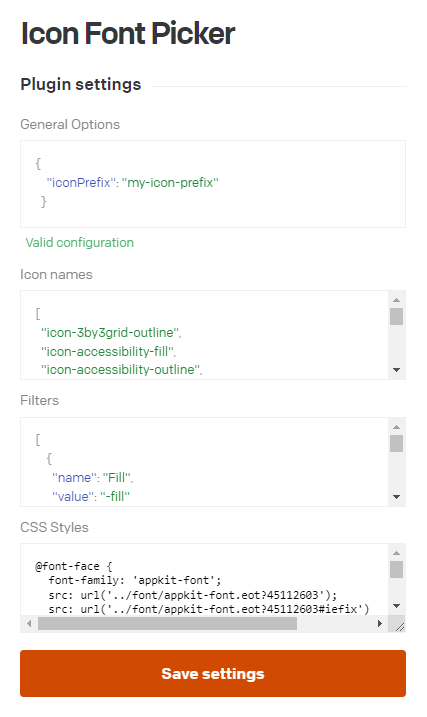
After installation (or migration from v1.x), the plugin stores three assets:
icon-picker-fields-icons.json: List of icon namesicon-picker-fields-filters.json: Filter definitionsicon-picker-fields-styles.css: Icon font CSS styles
These assets are managed automatically through the plugin settings interface.
General Options
A field that holds general options in JSON format.
- iconPrefix: if the icon font requires a prefix CSS class to show up (eg.
my-prefix icon-arrow-right), you can add it here (optional)
Icon Names (required)
The plugin needs to know the icon names (that is, the CSS class names). They can be added as a JSON array in this field.
Example:
[ "icon-menu", "icon-arrow-left"]These names will be returned when selecting an icon, see the "Usage" section below for more.
Filters (optional)
If you would like to add filter checkboxes to the UI, you can set "filters" here.
Filters consist of two parts:
- name: this will be the checkbox label on the UI
- value: part of the icon (CSS) class name to match
Example:
[ { "name": "Arrow icons", "value": "arrow" }, { "name": "Filled icons", "value": "-fill" }]CSS Styles
The plugin was made to be self-contained and to be used with any icon fonts. Because of this, all font-related CSS should be put here:
- @font-face in base64 format (the entire font, can be big)
- individual icon styles, eg.
.icon-arrow-right:before { content: '\ea8a'; }
Field settings
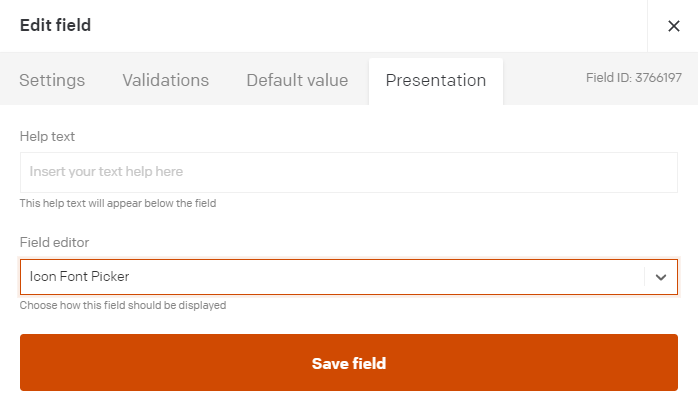
After installing the plugin, you'll need to add a new JSON field type to a block or model, go to the Presentation tab, and select "Icon Font Picker" for the Field editor.
Usage
The data structure will be a stringified JSON object with the following structure:
{ "icon": "icon-arrow-right"}You can use it on the frontend by adding as a class to an element, like the way icon fonts are used normally.
Development
If run locally, the plugin is available at port 3022: http://localhost:3022.
Limitations
- only one icon font can be used
- only one icon can be selected
Acknowledgements
DatoCMS Font Awesome plugin
This served as the base of this plugin and helped a lot to bring things together easily.
<https://www.datocms.com/marketplace/plugins/i/datocms-plugin-fontawesome>
DatoCMS Visual Select plugin
The JsonTextArea used for the plugins was borrowed from here. Great plugin by the way.
<https://www.datocms.com/marketplace/plugins/i/datocms-plugin-visual-select>