Integer picker
Replace integer fields that have min and max validation with a slider, stepper, or step buttons.

Integer picker
A DatoCMS field editor for integer fields that already have a minimum and a maximum. Editors pick one appearance per field: a slider, a stepper, or a short row of steps.
What it looks like
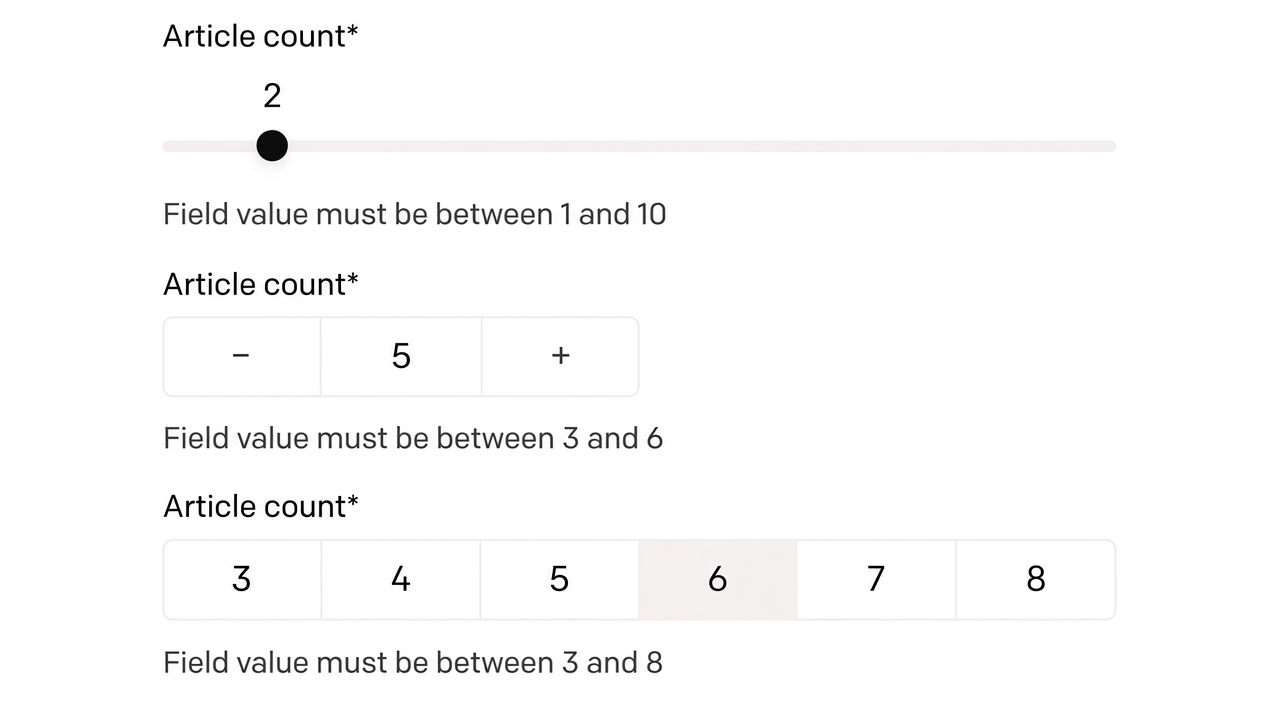
Requirements
- Field type is Integer
- The field’s Validations tab has both a minimum and a maximum, and min is less than max
If either bound is missing, the editor shows a short notice instead of a control.
Appearances
Set Appearance in the field’s presentation settings after you assign Integer picker.
| Appearance | Best for | Behavior |
|---|---|---|
| Slider | Wide ranges | Drag the knob. The current value sits above it and tints while you drag. |
| Stepper | Nudging one at a time | − and + move the integer by one. + writes the minimum when the field is empty. |
| Steps | Short, enumerable ranges | One button per integer from min to max. |
Steps only renders when the inclusive range is 12 values or fewer. A range of 1–8 is fine. A range of 0–100 is not; tighten the bounds or switch to Slider or Stepper.
Install
From npm
- In the DatoCMS project, open Settings → Plugins and add
datocms-plugin-integer-picker. - On an integer field, open Presentation and set the editor to Integer picker.
- Choose Slider, Stepper, or Steps.
Local development
pnpm installpnpm --filter datocms-plugin-integer-picker devThen add a private plugin whose entry point is http://localhost:5173/. Use Chrome or Firefox; Safari does not handle localhost plugin iframes well.
To keep a working Marketplace install untouched, duplicate it and point only the copy at localhost.
Empty and disabled fields
An empty field stays empty until the editor moves the slider, presses +, or picks a step. Opening a record does not write a default.
When the field is disabled (permissions, workflow, or a locked record), the control does not accept input.
Publish
cd plugins/integer-pickerpnpm publishThe package publishes dist/ plus the marketplace images in docs/. Bump version before each release. Existing DatoCMS installs do not update themselves; use Switch to a different version.