Zoned DateTime Picker DatoCMS Official Plugin
Zoned DateTime Picker is a DatoCMS plugin that stores datetime timestamps with time zone information. Outputs a JSON with ISO8601 and IXDTF strings, the IANA time zone string, UTC offset, and more.
Zoned DateTime Picker
This is a DatoCMS field editor plugin for storing zoned datetime information in a JSON field. It provides a GUI for picking a date, time, and IANA timezone, then stores a JSON object that includes an ISO 8601 datetime string, a RFC 9557/IXDTF zoned datetime string, a UNIX timestamp, and other helpful fields.
Screenshots
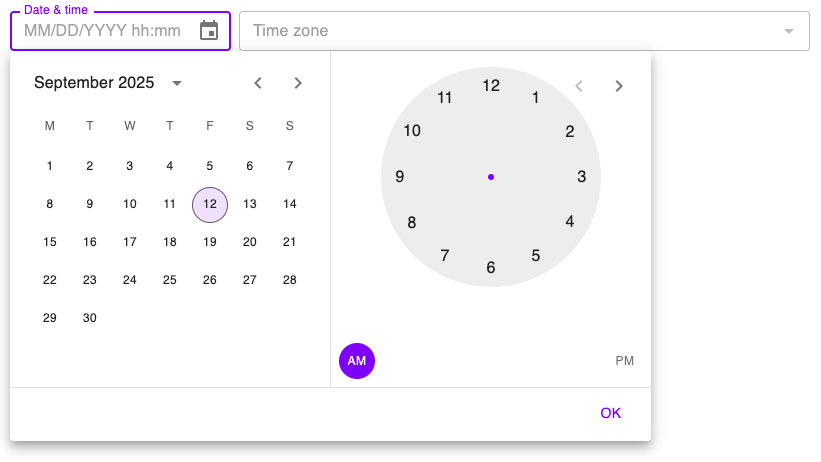
Date & time picker
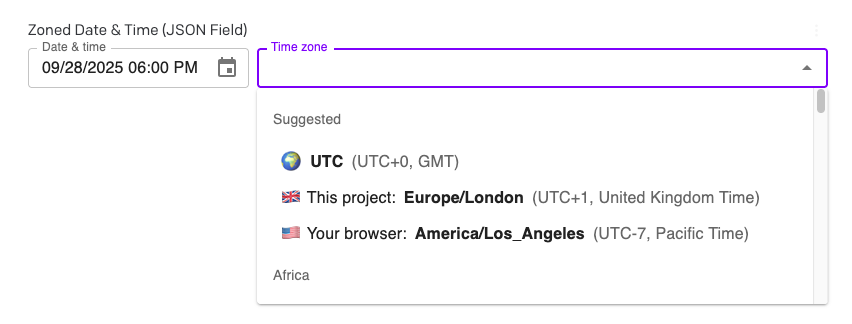
Time zone picker (uses IANA TZ strings)
JSON Shape
Once you select a date, time, and time zone, the plugin stores an object like this:
{ zonedDateTime: "1996-12-19T16:39:57-08:00[America/Los_Angeles]", // RFC 9557 / IXDTF string (Temporal-friendly) dateTime: "1996-12-19T16:39:57-08:00", // ISO 8601 string with numeric offset zone: "America/Los_Angeles", // IANA TZ identifier offset: "-08:00", // Offset from UTC, same as in the ISO 8601 string date: "1996-12-19", // ISO date time_24hr: "16:39:57", // 24-hour time time_12hr: "04:39:57", // 12-hour time (no AM/PM suffix) ampm: "pm", // AM/PM marker for 12-hour time timestamp: "851042397", // Unix epoch timestamp (seconds), as a string}How to use
This is a field editor that can override any JSON field in your project.
- Install the plugin to your project
- In your schema, navigate to the JSON field you wish to edit
- Go to its "Presentation" tab
- Under the "Field editor" section, choose Zoned DateTime Picker
- Save the field
- Return to content editing. The plugin should replace the raw JSON field.
Why would I use this? Why not use the built-in date & time field?
When you enter a datetime into DatoCMS's default datetime picker, we do not actually save the time zone or offset you originally selected. Instead, two implicit conversions happen:
- In the UI, you'll see the selected time displayed in the time zone configured in your personal Editor Preferences. Editors in different time zones will thus see different values.
- In the APIs (either the CMA or CDA), we will instead return the time zone configured in your Environment Configuration. This is not affected by any editor's personal UI preferences.
As an example:
-
In the date picker field, you initially enter
2025-01-01T00:00:00-08:00in US Pacific time and click save:
-
When you next refresh the record, it will instead show in your editor's configured UI time zone, like
2025-01-01T08:00:00Zin London time/UTC:
-
Then if you request it via an API, it will show a different time altogether, your environment's configured API time zone, like
2025-01-01T09:00:00+01:00in Rome: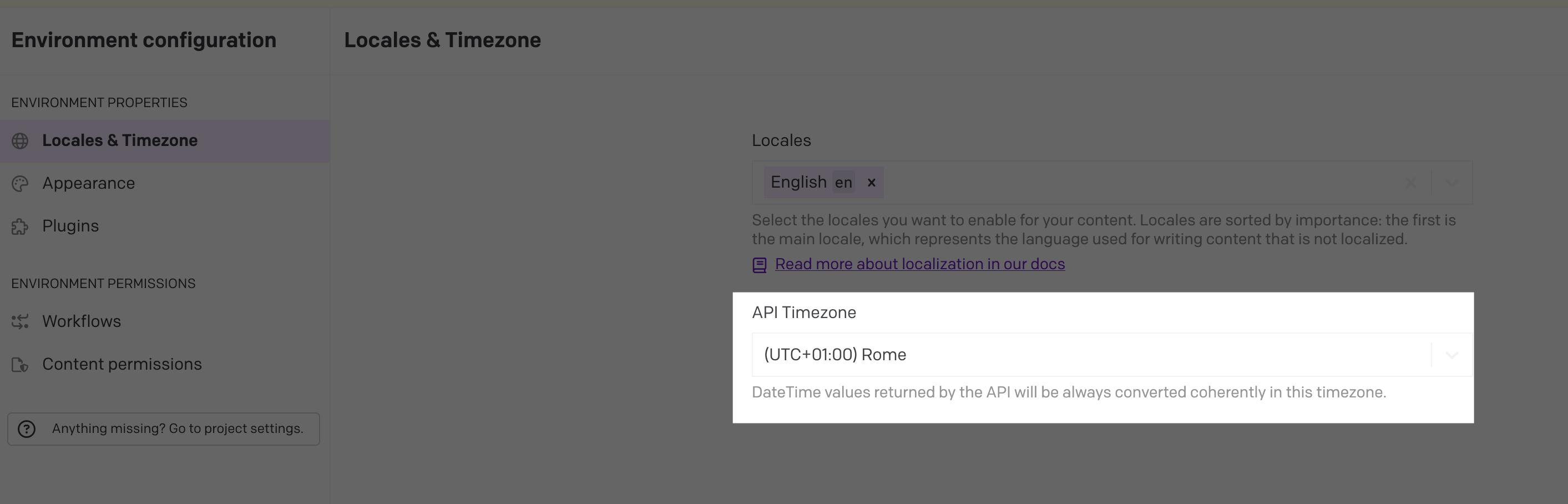
-
The original time zone and offset (Pacific Time or -08:00) are lost forever. In every case, the underlying timestamp is still the same, but the time zone and offsets are impliclity converted to either the UI or API setting. Without this plugin, there is no way to recover the original time zone.
This generally isn't a problem if you only operate in one time zone. But it matters for some use cases:
-
It makes cross-time-zone marketing difficult. It unrecoverably loses the original offset (
-08:00). If your event was inAmerica/Los_Angeles, your website was inEurope/Rome, and your visitor was inEurope/London, your frontend would have no way to know which time zone to use. -
It doesn't respect daylight savings time. With an ISO 8601 offset like
-06:00, there is no way to know if that is being used for a region that observes daylight savings time (like CDT, Central Daylight Time, in the USA) or one that doesn't (like Mexico City, which uses CST, Central Standard Time, instead). Going from a IANA time zone string likeAmerica/Chicagoto an offset like-06:00is a one-way, lossy operation. You cannot go back from-06:00to a time zone string, because you don't know if it was originallyAmerica/Chicago(which is usually-06:00but is-05:00in the summer and autumn due to DST) orAmerica/Mexico_City(which is always-06:00).
The plugin does two things to address this situation:
- It remembers the original offset you chose. If you entered the time in
-08:00, it stays that way and does not get coerced to any other offset. - It adds an explicit IANA time zone string like
America/Los_Angeles. Your frontend can then use that time zone to ensure proper display viaIntl.DateTimeFormat()or a helper library like Luxon.
This information is available in several formats in the JSON output (see JSON Shape above).
Supported localizations
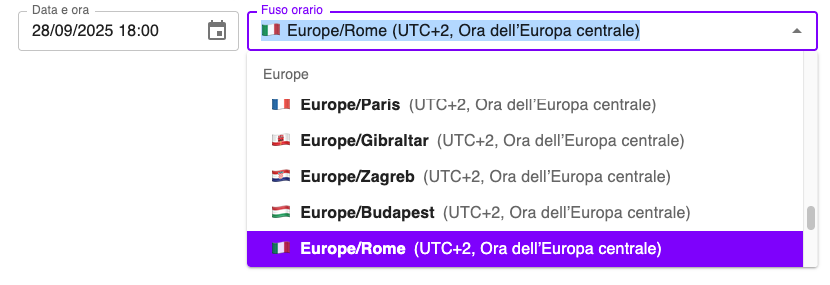
The plugin supports localized datetime entry and time zone names in the following languages:
- English (en)
- Italian (it)
- German (de)
- French (fr)
- Czech (cs)
- Dutch (nl)
- Portuguese (pt)
- Spanish (es)
If your editor's preferred locale is not in this list, the plugin falls back to English for its UI.
Changelog
- 2.3.0 - Full dark mode support: the picker now follows the DatoCMS light/dark theme by mapping the new semantic color tokens into the MUI palette, and the editor no longer flashes white while the iframe loads. Also upgrades
datocms-plugin-sdkanddatocms-react-uito 2.2.x. - 0.1.8 - Added missing Spanish localization. Upgraded to MUI 9 and other library updates. Also fixes timezone initialization on the first date pick, an on-mount write that could mark the form dirty or overwrite unparseable values, and some minor cleanup & refactoring throughout. Special thanks to fitzage!
- 0.1.7 - Fix for Dark Mode crash. (True dark mode support coming later)
- 0.1.6 - Moved plugin to official DatoCMS plugins repository. This was just an organizational change and does not add any features or fixes.
- 0.1.5 - Minor package updates and readme clarifications
- 0.1.4 - Minor bug fixes
- 0.1.2 - Initial release
Attributions
This plugin was made with:
- MUI-X React UI components
- Luxon DateTime library
- IANA Time Zone Database
- OpenAI Codex and Claude Code