Improved plugin development & release workflows
Currently, developing plugins is a liiiitle more cumbersome than just "install it and configure it": you fork one to build a new version, pin an exact release, check it locally, adopt a package... etc., etc.,.
We've replaced all of that with a proper set of workflows, grouped under a new For developers menu on every plugin.
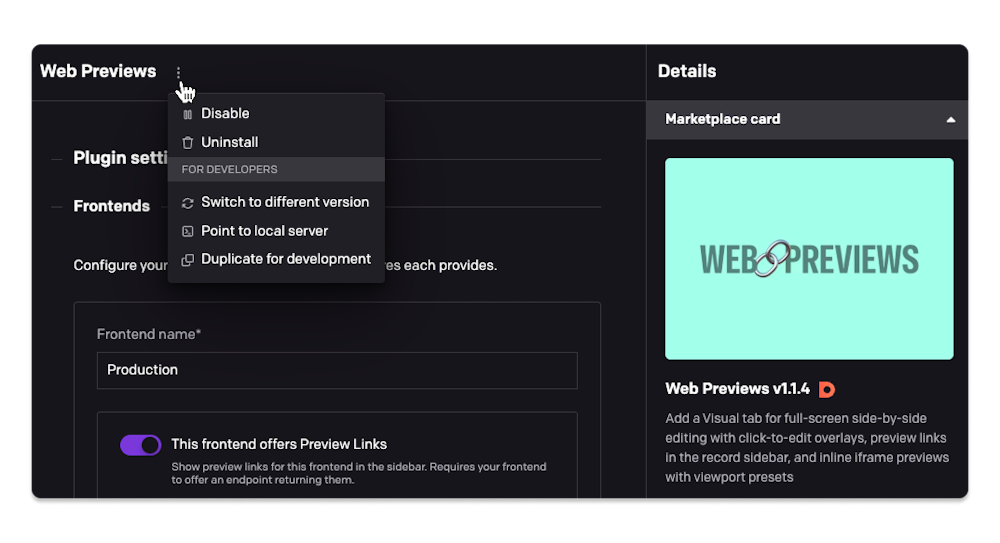
Here's what the new workflows enable:
Fork a plugin to develop against it safely. "Duplicate for development" creates a private copy of any plugin, ready to point at your dev server. It offers to disable the original at the same time, so you don't end up with two near-identical entries wherever plugins show up while you're mid-development. The copy isn't assigned to any field, so if you need to test it where the original is in use, reassign that field to the copy by hand.
Or skip duplicating altogether. "Point to local server" allows you to point the existing plugin straight at your dev server without making a copy, and start making your changes on it. It detaches the plugin from npm (it becomes private, and stops receiving Marketplace updates) until you point it back with "Switch to Marketplace version".
Bring a private plugin onto the Marketplace. "Switch to Marketplace version" points a private plugin instance at an already-published package allowing you to publish the plugin to the marketplace. Its configured parameters and field assignments are left exactly as they are.
"Switch to different version" pins any Marketplace plugin version (pre-releases included). It's how you'd stage the rollout of a new release for a popular plugin: publish it to npm without tagging it latest, pin that exact version here to try it yourself on a real project first, and once you're happy with it, tag it latest on npm so it propagates to every other project tracking the package.
Aside from these, plugins can now be disabled. A disabled plugin behaves as if it were never installed: no code loads, fields fall back to their default editor, nothing renders. The configuration of the disabled plugin stays untouched, so you can isolate a slow or misbehaving plugin and switch it back on later.