How to make your website agent-ready (and how we did it)

TLDR
Most of "agent readiness" is boring technical SEO: server-rendered HTML, a tweaked
robots.txt, a real sitemap, canonical URLs, structured data, JSON-LD, y'know, the stuff we all hate 🥱The genuinely new bits are Markdown versions of your pages,
llms.txt, Content Signals, and, if you're a product with an API, discovery files for your API, MCP server and Agent Skills. Those are mainly proposals though, AFAIK aside from .md, nothing is a guarantee, but I've seen some improvements.Cloudflare's isitagentready.com is a handy (albeit unofficial) way to check where you stand.
We ran datocms.com through it and adapted our stuff to add in a few things that seemed logical. Here's what we set up and how it's generated from the CMS.
I've written a fair bit about AI and content lately (kills a bit of my soul and cognitive trust every time), from indexing your content for LLMs to shipping an llms-full.txt for our docs.
So it felt fair to put our own website under the metaphorical microscope, and show the setup instead of just talking about it.
TH does "agent-ready" even mean?
TBH. There's no official standard.
There are a handful of proposed ones, a lot of brand new acronyms, and at least a few really logical sounding recommendations on how to set standards for AI discovery.

The most practical checklist we've found is Cloudflare's isitagentready.com, launched in April 2026. You give it a URL, and it checks a set of emerging standards across a few categories:
Discoverability:
robots.txt, sitemap,Linkresponse headersContent accessibility: Markdown content negotiation
Bot access control: AI bot rules, Content Signals, Web Bot Auth
Protocol discovery: API catalog, OAuth discovery, MCP Server Card, Agent Skills, WebMCP, and a few more
Commerce: x402, UCP, ACP and friends
If you want the long version of why most of this is boring old-school technical SEO, here's a shameless plug to a whole rant about it on my own website because I want the backlink, so I won't repeat everything here.
The one bit worth repeating tho: most AI crawlers don't execute JavaScript. GPTBot, ClaudeBot and PerplexityBot read the raw HTML and move on. If your content only appears after client-side rendering, none of the fancier stuff below matters.
The boring foundations (that we got tired of over the years)
Before anything shiny on this website, we bossman made sure the basics were in order. datocms.com runs on Astro, with content coming from DatoCMS and pages rendered to HTML, so crawlers get the full content without running any JS.
On top of that:
A sitemap generated from the CMS, with
lastmodcoming from each record's actual update date, not the date of the last build (don't be cheeky).Canonical URLs set from a CMS field, so one piece of content has one URL, no matter how many UTM parameters get stuck on the end.
Structured data (schema.org JSON-LD) generated from the same fields we fill in.
Real headings and structure, which Structured Text more or less forces on you anyways. An editor can't fake an
h2with bold text.
Stefano has written up the SEO side of the Astro rebuild in more detail, if you want the nerdy version.
Telling bots what they can do
Our robots.txt includes a Content Signals line that says what AI systems can do with our content:
User-agent: *Content-Signal: search=yes, ai-input=yes, ai-train=yesWe say yes to all three. We want agents to read our docs and our site and answer questions about DatoCMS accurately. For a publisher whose business is the content, ai-train=no might make more sense. There's no right answer, but it's a decision someone on the marketing side should make on purpose, rather than leaving it to whatever the default is.
ℹ️ YSK that this is ONLY for the website. Our actual CMS is hard-noIndex, so none of your content is EVER used for AI to learn from (from our side).
One gotcha worth checking on your own site: make sure your WAF or bot protection isn't blocking the crawlers your robots.txt allows. A robots file that says "come in" and a firewall that returns 403s is a surprisingly common combo.
Markdown for agents
HTML is written for browsers. JS is written for us because we love pretty animations. Agents have to wade through navigation, footers, cookie banners and scripts to find the actual content.
Which, apparently, they can't be bothered to do.
So every page on datocms.com also exists as clean Markdown at the same path, with .md on the end. This post, for example, is also available at /blog/how-to-make-your-website-agent-ready.md. No nav, no footer, just content.
On top of that, we publish:
/llms.txt: a short Markdown overview with links to the pages we'd want a model to read first/llms-full.txt: the full documentation in one file, which people paste straight into Cursor or Claude
Because every page comes from structured records in DatoCMS, none of this is maintained by hand. The .md versions are just another template rendering the same fields, and llms.txt is generated at build time by querying the CMS. When an editor publishes a new docs page, it shows up everywhere automatically.
Is llms.txt a proven standard?
No.
Google has openly compared it to the keywords meta tag. But for a developer tool whose users paste docs into coding agents daily, it's been genuinely useful, and it cost us me Claude an afternoon.
Personally, I disagree with Google. I've started getting FAR more accurate answers about us whenever I talk to LLMs. Is this scientific, no. But clearly vibes suffice lately 😶🌫️
Letting agents do things
This is the part that's only relevant if you're a product with an API. For a marketing site, skip it. For us, it's the most important part.
An agent that lands on datocms.com and wants to actually work with DatoCMS needs to find four things: our APIs, our MCP server, our Docs, and instructions on how to use all of them properly. So we publish discovery files under .well-known:
API catalog at
/.well-known/api-catalog, following RFC 9727. It lists our Content Delivery API (GraphQL), Content Management API (REST, with its JSON Hyper-Schema), the Real-time Updates API and the Asset API, each with links to docs and our status page.MCP Server Card at
/.well-known/mcp.json, which tells MCP clients where our remote MCP server lives and which protocol versions it supports.Agent Skills index at
/.well-known/agent-skills/index.json, listing our Agent Skills for the CDA, CMA, CLI, content modelling, frontend integrations, plugins and project setup, each with a download URL and a checksum.
Cloudflare's own data from the top 200,000 domains found fewer than 15 sites with an MCP Server Card or API catalog. So this is very much early days, and I can't be pretending that agents are all out there reading these files YET. But they're small, static, and cheap to publish, so the very scientific decision we made to implement this was "well, what's the harm?"
Our score (and where we lose points)
We scored 60/100 on isitagentready.com at the time of writing this, and it used to be about 15-20 before we implemented things.
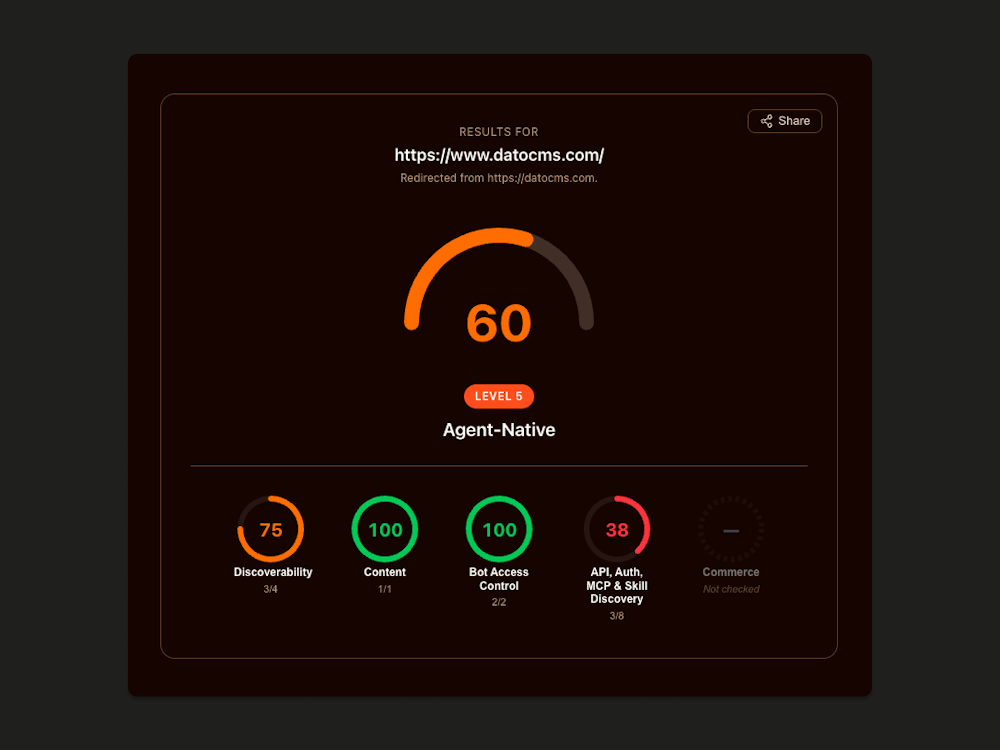
Sounds better than most websites, but doesn't LOOK too great...
So if I get cheeky and just exclude the stuff not relevant to us (like eCommerce things), I can pet my vanity.
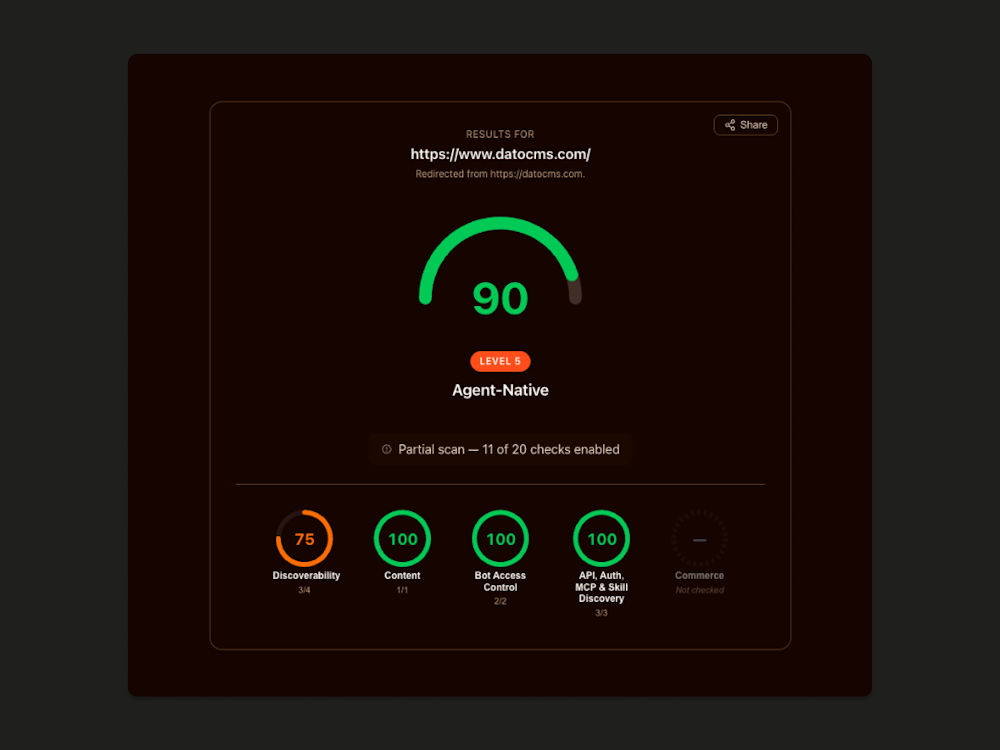
But what does this all even mean, defluffed...
AI agents can find us, read us, and actually do stuff with us. There's an llms.txt mapping all our docs. Our robots.txt explicitly says AI is welcome. And there's a discoverable MCP server, so an agent can manage content and schema directly instead of scraping our docs and hallucinating or hitting a roadblock 🤌
Some of those we'll fix. Some we're skipping on purpose because we've got nothing to do with eCommerce. We don't sell anything through an agent checkout, so the commerce protocols aren't relevant, and we'd rather not publish files just to game a score that was made up by Cloudflare.
How to do this for your own site
If you're on a headless CMS, here's the order I'd tackle it in:
Run isitagentready.com on your homepage and one key content page. Treat the score as a to-do list, not a grade, and a to-do list that's filtered out for things relevant to you (depending on whether you have products or APIs, half of it isn't even relevant).
Check what crawlers actually see. View source (not inspect element) and make sure the content is in the HTML.
Fix the boring stuff: robots, sitemap
lastmod, canonicals, status codes, JSON-LD.Decide your Content Signals and add the line to
robots.txt.Add Markdown versions of your pages as another template, and generate
llms.txtfrom the CMS at build time.Only if you have an API: publish an API catalog, an MCP Server Card and an Agent Skills index.
Steps 3 to 5 are where a headless CMS makes a real difference. If your content lives in structured records, every one of those outputs is just a different way of rendering the same fields. If it's locked inside a page builder, you'll end up scraping your own website to make it readable. Very not fun.
None of this is magic, and no score will guarantee an agent recommends you. What it does is remove the reasons an agent can't read, understand or use what you've published.
Ultimately though, I do see more AI citations when I check out my aHrefs dashboard (can't share any more details because soz I'm not feeling like paying $650/month to get that report 😒 you can check yours under Site Explorer > AI Responses if you use it).
And I definitely get way better answers from GPT and Gemini and Claude when I chat about Dato.
If you want to poke at our setup, all the files above are public. And if you want help figuring out yours, you know where to find us.
