Pick the exact frame that represents your video
Heavy on video usage and want to set a specific frame as the thumbnail from within the CMS itself? Now you can.
TL;DR: You can now choose the poster frame for any video right from the asset editor. Choose the perfect moment, pin it, and that frame becomes the video's thumbnail everywhere. No re-encoding, no external tools, no guessing which frame the player will grab.
How it works
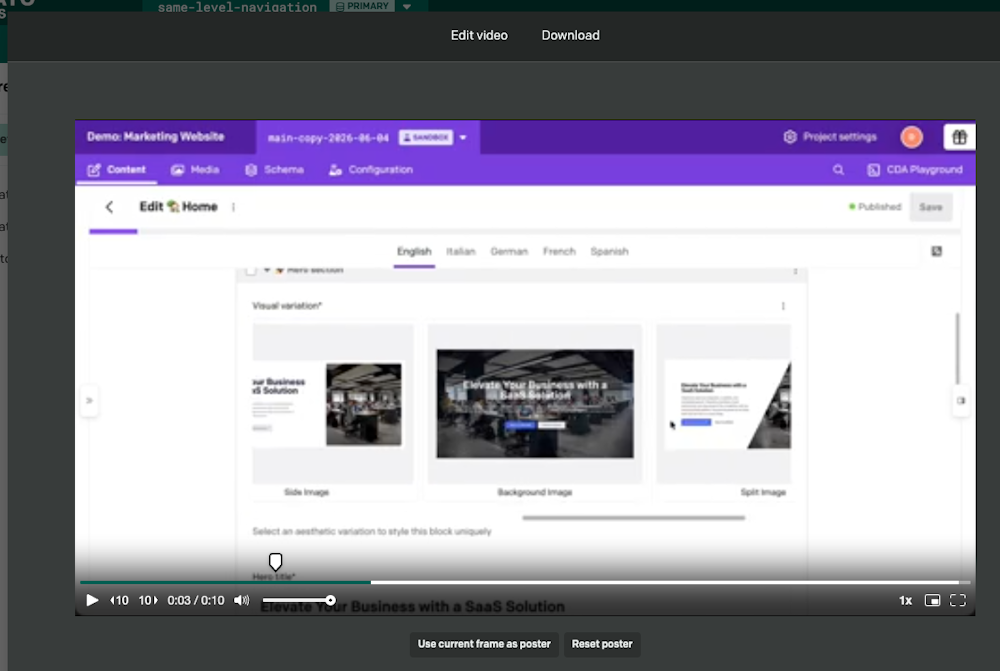
Open a video asset and you'll find a poster picker built right into the player:
Head to the frame you want. A pin on the seek bar marks the current poster frame, aligned precisely to the player's timeline so what you see is what you get.
Hover the pin and a large, high-resolution thumbnail shows exactly how that frame will look as the poster, sized to fit whether you're in the media area, a modal, or the sidebar.
Select Use current frame as poster and your choice saves instantly.
Under the hood
The chosen frame is stored as poster_time (in seconds) inside the upload's default_field_metadata, the direct video analogue of focal_point. Like the focal point, it's a non-localized, per-asset default, so it travels with the asset and is available through the Content Management API for your front end to consume when rendering posters.
Thumbnail selection is precise to the hundredth of a second. The time readout shows m:ss.cs, so you can land on an exact frame rather than a rough area — 1:04.27, not "somewhere around 1:04".