When to use Skills vs. the DatoCMS MCP

Oh look, a 100% human written article about using AI (I'd love to say its because I'm idealistic, but in reality, hello Text Watermarking in the EU 🤭).
Anyways.
Our own docs are pretty opinionated about when to choose Skills and/or the MCP. Working in a local repo? Install Agent Skills and skip the MCP. No Terminal? Skip skills and use the MCP.
Pick one.
Not both.
Much binary.
But that's ✨mostly✨ correct, considering best practices, for about 90% of what you'll do.
It doesn't account for my own laziness, and since I reach out for the MCP inside Claude Code all the time, let me contradict things and introduce a third option.
Understanding Agent Skills and the MCP
Agent Skills are markdown playbooks for your agent to load on demand. They wrap the CMS CLI, they know how to model content, they know how to wire up a frontend, they know how to write a clean migration, they know how to build a plugin, all the fun deeply technical stuff. They run with the full permissions of your machine, so they can read, write, run shell, hit the network, etc., etc. They're built for... well, building.
The MCP is a slightly more guarded approach to managing your content. The difference, is what Claude would call LOAD BEARING. With OAuth and no tokens on disk, the MCP uses a layered approach with tools rather than 500 raw endpoints, giving you an efficient way to manage content operations. Every script it runs is sandboxed, read-only by default, and never actually sees your API tokens. It's built for when there's no terminal.
But realistically speaking, can the MCP "build" your project? Yeah, of course. I cover it in the user guide myself. But the reason we suggest one rather than the other isn't capability, it's applicability. Skills reach into your machine, the MCP holds back on what the agent can touch.
The reason we split the use
The docs say "use the MCP to help your content and editor teams improve their workflows; use Skills when you're working against DatoCMS API".
What this means is: Terminal open? Use Skills. No Terminal? Use MCP.
If you're a dev with the IDE open, you want the agent to do the thing, correctly, on the first try, instead of confidently hallucinating field types that don't exist.
Skills come in two packs, the project pack, for building a project, and the plugin pack, for building plugins. Here's a quick TLDR of the capabilities:
Content Modelling: The agent can figure out whether to use models or blocks, references or embedded blocks, taxonomies, field shapes, validators, editor appearances, all the stuff that needs brainwork.
Reading Content: The agent can do things like "write a GraphQL query to fetch all blog posts with images", and infer things like filters, pagination, localisation, modular content, Structured Text, responsive images, SEO, etc. etc.
Writing Content and Automation: The agent can run programmatic CMA scripts, record CRUD, do bulk importa/exports, manage assets, fork environments, handle webhooks, manage roles and tokens, check audit logs, and, OK I'm running out of adjectives.
CLI Workflows: The agent can "properly" handle schema-type generation, run environment ops, CI/CD pipelines, other CMS imports, etc.
Frontend Integrations: The agent can manage web previews, visual editing, cache tags, sitemap wiring, and so much more, across Next.js, Nuxt, SvelteKit, and Astro.
Plugins: Create, extend, and design plugins anywhere in the CMS.
All of this is code related. It lives ON your machine, it's version-controlled, and it wants senior dev instincts baked in just like what you expect when you start your prompt with "take on the role of a principal/staff web developer who used to be a lead frontend designer but also is a systems architect as a side hustle". It's why we recommend using Skills to do everything you would with your Terminal/IDE, because Skills already wrap the DatoCMS CLI.
The MCP on the other hand, is designed to make life easier when there's no Terminal involved, which is why, although it CAN manage schema stuff, we recommend it for editors. Or for developers who want to be a little lazy and do things on the fly from their browser or mobile.
The MCP is great for when you need to handle:
Everyday content ops: creating records with several fields, updating records, publishing records, unpublishing records.
Translations: Adding translations to existing content, one at a time or in bulk.
Assets: Uploading assets and attaching them to records without much fuss.
Linking and Copying: Linking records together or copying content between models.
Querying: Listing and querying records to find the thing you're after (literally, I've used it for "find me the link to the record where I mentioned Clippy" because I couldn't find it.
The boring stuff: Bulk updates, content migrations, SEO updates, all the stuff that's a chore.
The MCP reaches your project through OAuth to do things AS YOU; nothing to install, nothing to configure, no tokens, nothing.
So while one CAN do the others' job, it's not HOW we designed it to, because we think one wins over the other depending on the use case.
The cheeky third option
But what if you're lazy AND technical? I mean, Claude Code is both, a terminal AND a fluent MCP client. Why choose one. WHY HAVE US TELL YOU WHAT TO DO. You weren't going to listen to us anyways. You don't want to choose. To you I say:

Full disclosure: This is what I do ALL the time. I just use the MCP in Claude Code to handle everything in one prompt. I'm not saying I'm good at it, I'm just lazy, and I'm terrible at prompting. This is not recommended best practice, I am not responsible for anything breaking on your projects, don't @ me!
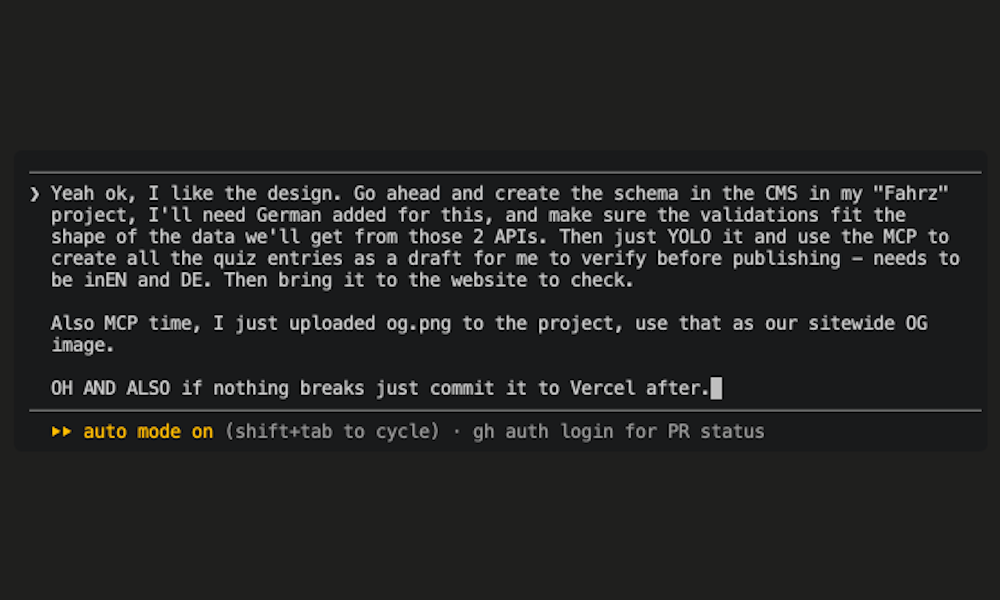
So nothing's stopping you running both in one session. The question was never can you. It's when's it actually the smarter move.
Here's a few scenarios in which I combine the MCP with Skills to make my life a little easier (and boss-man's code reviews a little more annoying).
Anything across more than one project
Skills wrap your local repo's CLI. One repo. One project.
The MCP OAuths into everything you have access to: personal account, orgs, the lot, and lets you operate on any of them in the same session without restarting anything.
So when I need to modify the schema in an environment on one project, but bring in assets from another project, or reference the SEO from a third project to create into the first project, I combine skills with MCP capabilities in the same session to feel like I'm actually useful.
Bulk-YOLO-ing on PROD
Say I need to re-slug 3000 posts, rewrite the internal links, add redirects, and republish. On production.
Claude with Skills would happily do it with the full permissions of my machine and my CLI token, which is exactly as relaxing and therapeutic as it sounds when the target is live content.
Through the MCP, things are different. The agent explores read-only first (the safe script variant physically blocks every non-GET request at the network layer, and it can't write even if the model gets ideas). Then, and only then, it asks me to confirm the write. It never sees my real token. Every API method it calls has to be pre-declared, or the script gets rejected before it runs.
That's slower. So I string things together. MCP the re-slugging first, then bulk publish, then instantly Skills add the old slugs to new slugs on redirect and push, deploy. Lovely handoff.
Bigger refactors
This is my favourite, because it uses both tools for exactly what they're good at, and it's quite likely to be an approach you'll encounter, unlike the previous two where I'm clearly doing things I shouldn't
Before I write a real migration, I check the live data through the MCP. How many records actually use this field? Which locales are half-baked? Read-only, no risk, no repo acrobatics. No bearing of any loads.
Then I take what I learned and write prompt the permanent, version-controlled migration in the CLI thanks to Skills.
In those military terms that Claude loves so much: MCP as the recon drone. Skills as the demolition crew.
So in summary, when should you use the MCP vs. Skills?
| Use case | Where you probably are | Reach for |
|---|---|---|
| Schema, frontend, migrations, plugins | Repo/IDE | Skills |
| Content ops, any kind | Web/Mobile | MCP |
| Content ops on live / foreign / multiple projects | IDE | MCP in the terminal |
| Building AND heavy live content ops, same session | IDE | Both |
What you do need to consider though (honest caveat, because I have the same limits as you, I didn't get some all-access-no-limit version of the MCP):
The MCP is token hungry: We've scoped it REALLY well to minimise consumption by taking a tool-based approach, but it's still got an appetite. It pulls full method docs and examples for accuracy (unless you give it the very specific bits, but who remembers that), which is great for success rates and rough on your token count. For pure build work, Skills are leaner. Don't run the MCP for a job Skills already own.
Limits gonna limit: Per-script timeouts, monthly time budgets, etc. Massive undertakings will hit these limits, for genuinely big projects and migrations, batch them into chunks and use the CLI.
Don't run both for the same thing: Even when combining, use each approach for different aspects of the same thing, don't blitz your token with asking one to redo or recheck the other's work all the time.
SO, all that's left is to then get started 👇
Skills:
/plugin marketplace add datocms/agent-skills/plugin install datocms@datocms-skillsMCP:
claude mcp add --transport http DatoCMS https://mcp.datocms.com✌️

