This was really fun to work on because this grew out of some very real frustrations from some editors. Editing content in languages like S'gaw Karen used to look broken in some browsers. In Firefox, for example, you'd see stray dotted circles around characters, or empty boxes (the "tofu" ▯) where an actual glyph should be
That's fixed. When your OS doesn't have a font for a script, the CMS interface now falls back to the matching Google Noto font. This covers Unicode's Recommended and Limited scripts, so Myanmar, S'gaw Karen and a long list of other regional writing systems now render correctly in the editor, whatever browser you use.
The fonts download only when a page actually contains one of those scripts. If your content is all Latin, Cyrillic, CJK or Arabic, nothing changes for you and no extra weight is added!
If you manage multilingual projects in less widely supported languages, have a look and tell us if anything still looks off.
We've gotten rid of a few pesky bugs that were getting in your way when building plugins:
Dark mode inputs now match. In dark mode, text boxes inside plugins were a different shade from the native DatoCMS text boxes, so plugins looked slightly off. That's no longer an issue.
Plugin text size now matches the rest of the UI. DatoCMS shrinks its base font size a tiiiiiny bit on smaller screens, but plugins always stayed at full size, so they looked wonky and oversized next to everything else. Plugins now follow the same sizing and adjust when the screen size changes.
Typing lag in plugins is fixed. This is (was?) the annoying one. The library that plugins use to talk to DatoCMS was doing a lot of unnecessary work on every message, which made typing feel sluggish when plugins were on the page. Processing time per message dropped from about 5–6ms to under 1ms, so typing is noticeably smoother.
Plugins no longer reload when you resize the window. Dragging the editor window across a certain width (1024px) made every plugin reload, and sidebar plugins could lose what was showing. They now stay put in place.
Special thanks to DatoCMS user convincible for this, who reported and helped us troubleshoot all four issues!
If you've ever triggered a big static build and watched it fall flat because of rate limits, this one's for you 🫶🏽
Earlier, with big builds, all those requests for pages/posts/etc., hit us at the same time, and some get rate-limited, so the client retried them. Plot twist, every retry also fired at the same instant. So we were constantly retrying in perfect lockstep.
To fix this, we've added jittering into the retries on the CDA client. Instead of all retries going out at once, we spread them across a small randomized window to stagger the requests.
If you run large static builds, this should slowly cut down your rate-limit errors.
You will need to npm update @datocms/cda-client for this to work on your project.
If you're connected to Claude, ChatGPT, Cursor or any other AI tool using the DatoCMS MCP, we've rolled out a few updates that should make things easier.
The first big change is how you authenticate your AI against our MCP server:
The screen now tells you who is asking for permissions. The name of the app is right in the title, together with the address the login will be sent back to. If the app you're installing isn't the one we've verified, the page says "Authorize an Unverified app" and highlights the destination in red, so you can stop and verify which app you're installing.
You decide how much the app can do. Besides picking which projects the app can access, you can now choose a level of access:
Only read content: read content and media, never write or edit anything.
Read and edit content (recommended for editors): the app can also create, publish, and delete content and media. It can do nothing on schema, settings, users, or API tokens.
Anything you can (recommended for devs): whatever your account can do in DatoCMS, the MCP can as well.
⚠️ Whichever option you pick is still restricted by your own user permissions in each project.
If you choose one access level, you can always revisit the config screen to edit this.
If you're already using the MCP, you'll need to reconnect it once. We've changed how the MCP server handles tokens: the token your AI tool receives now only works with the MCP server and is tied to the app that requested it, and the authorization code you get after signing in works one time. During your next session, Claude and ChatGPT will ask you to log in again. Other clients may need you to remove and re-add the DatoCMS connector.
With this new approach, the connection also remains logged in until you revoke it, unlike before, where you had to re-authorize the connection every 30 days.
Currently, developing plugins is a liiiitle more cumbersome than just "install it and configure it": you fork one to build a new version, pin an exact release, check it locally, adopt a package... etc., etc.,.
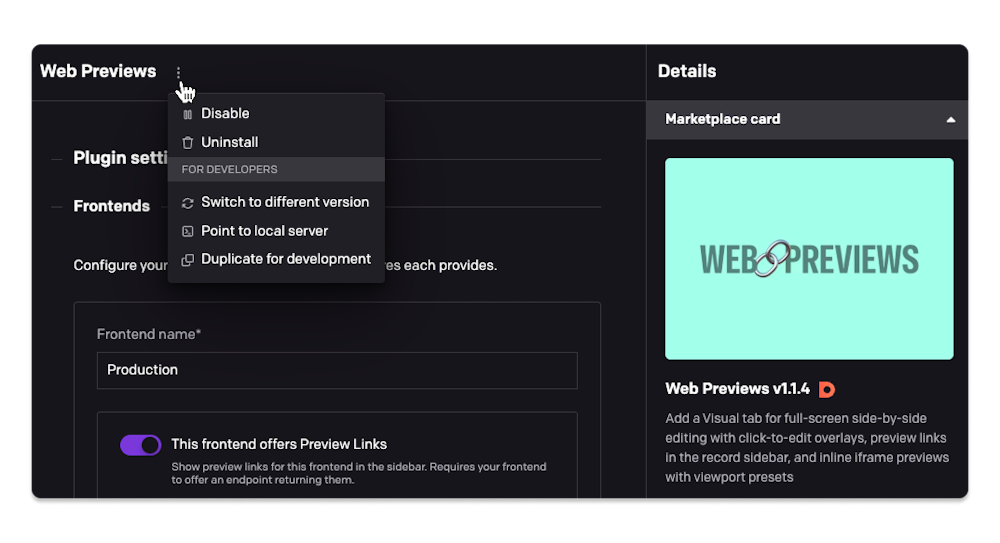
We've replaced all of that with a proper set of workflows, grouped under a new For developers menu on every plugin.
Here's what the new workflows enable:
Fork a plugin to develop against it safely. "Duplicate for development" creates a private copy of any plugin, ready to point at your dev server. It offers to disable the original at the same time, so you don't end up with two near-identical entries wherever plugins show up while you're mid-development. The copy isn't assigned to any field, so if you need to test it where the original is in use, reassign that field to the copy by hand.
Or skip duplicating altogether. "Point to local server" allows you to point the existing plugin straight at your dev server without making a copy, and start making your changes on it. It detaches the plugin from npm (it becomes private, and stops receiving Marketplace updates) until you point it back with "Switch to Marketplace version".
Bring a private plugin onto the Marketplace. "Switch to Marketplace version" points a private plugin instance at an already-published package allowing you to publish the plugin to the marketplace. Its configured parameters and field assignments are left exactly as they are.
"Switch to different version" pins any Marketplace plugin version (pre-releases included). It's how you'd stage the rollout of a new release for a popular plugin: publish it to npm without tagging it latest, pin that exact version here to try it yourself on a real project first, and once you're happy with it, tag it latest on npm so it propagates to every other project tracking the package.
Aside from these, plugins can now be disabled. A disabled plugin behaves as if it were never installed: no code loads, fields fall back to their default editor, nothing renders. The configuration of the disabled plugin stays untouched, so you can isolate a slow or misbehaving plugin and switch it back on later.
Filtering audit logs in the past meant creating queries with PartiQL, which is... not fun. No autocomplete, no syntax hinting, no inline validation, nada. Minor mistakes made queries fail, and that's not something you want when filtering out critical logs. I mean if you're filtering audit logs you're probably not having the best day to begin with, so why make it worse 😅
To make it a little more "fun", we've added a new GUI for building a filtered query, which should look very familiar to you.
No more guessing whatever a min_ulid() is, whether to single or double-quote, or what the correct query path for the record model is... (hint: it was request['payload']['data']['relationships']['item_type']['data']['id']... 😬?)
Now, just pick a date range and click to choose your filters, and we take care of the rest.
ℹ️ Audit Logs are only available on our Enterprise plans. If you want to add it to your project, get in touch!
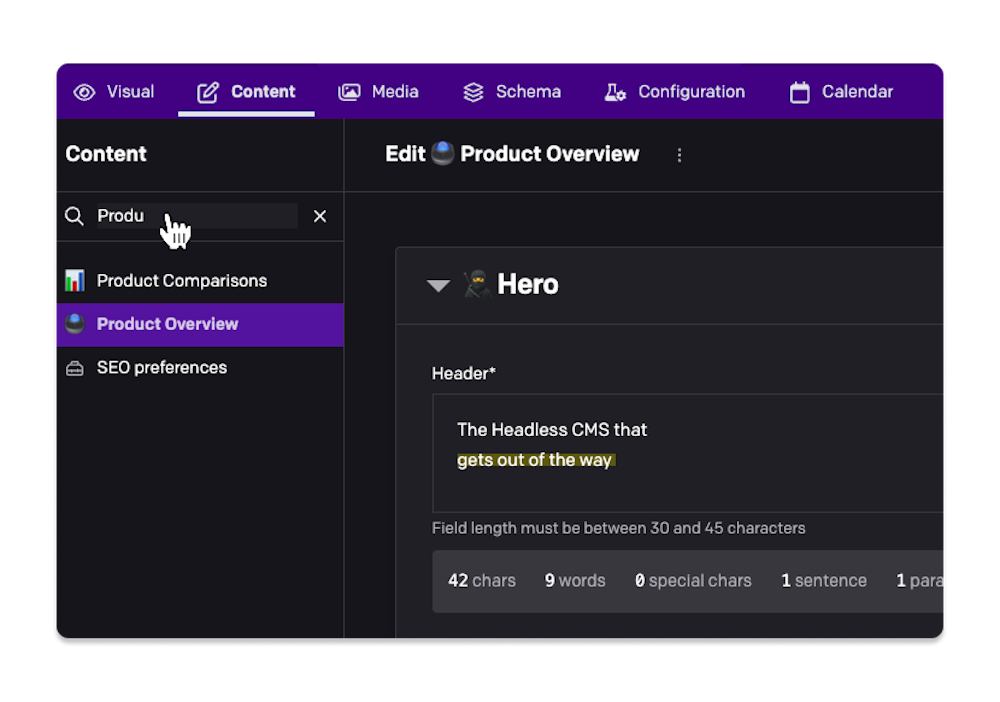
It can get pretty tiring to scroll through all your record types when looking for something specific, so we've rolled out a new sidebar filter to make things easier.
Click on the search bar, start typing, and see a filtered list of models to create/edit content for.
Starting from the 25 Aug, 2026, the custom palette under Configuration > Appearance won't be available as an option for new projects — it will only be possible to use monochromatic palettes. Pick a hue, and the rest of the palette (backgrounds, text, accents) is generated for you automatically, tuned for readability.
If your project was created before that date, nothing changes for you: custom palettes remain available, whether you're already using one or not.
Why we're making this change
Since early on, DatoCMS wanted to offer a way to customise the theme of a project's admin area, to give you as much creative freedom as possible over how your admin area looked. Over time, though, we heard from editors — the people actually spending their day inside these interfaces — that some custom palettes were tiring to read comfortably. After some research, we found that colour is harder to get right than it looks: contrast ratios, how a background reads against small text, how a palette holds up across every screen in the product.
That's the main reason we introduced the monochromatic system in 2024: it solves that problem by design. Every colour in the palette — text, backgrounds, accents — is engineered to meet WCAG AA contrast standards, so whatever hue you pick, the result stays comfortable to read. We've now decided to make it the standard for every project, keeping that quality bar guaranteed while still leaving room to personalize it.